

This is the gap between how workforce software gets sold and how it gets used. And it's the gap that determines whether your mobile app becomes the system of record — or another icon workers tap once and never open again.
The 1% Problem: Why Frontline Workers Still Get Hand-Me-Down Software
The numbers are blunt. Despite representing 80% of the global workforce, deskless workers receive only an estimated 1% of enterprise software investment. That's approximately 2.7 billion deskless workers globally sharing scraps of a software market built almost entirely for people sitting at desks.
The downstream effect is exactly what you'd expect. Although they are crucial to operations, only 1% of business software investment is directed towards tools for deskless employees. Consequently, many of these workers resort to using personal software to bridge the technology gaps they face. Translation: your schedulers are running shift offers through SMS chains, your timecards are getting reconciled by hand on Fridays, and your workers are using WhatsApp groups to coordinate coverage you have no visibility into.
The pain shows up in the data too. About 60% of deskless workers don't like their current tech tools. Many lack simple digital resources—61% use their personal phones to access benefits information, and more than half (54%) have limited email access. When the official tools don't work, workers route around them. Ghost shifts get traded in private chats. Credentials lapse because nobody pings the renewal reminder. Overtime stacks up before anyone sees it.
Important
A mobile app is not a "nice to have" benefit for your frontline workforce. For the 80% of your employees who don't sit at a desk, it is the system of record. If it doesn't work, the operation doesn't work.
The rest of this post is a field-level breakdown of what a workforce mobile app actually has to do — and what operators should stop tolerating from vendors who treat the phone as an afterthought.
Shift Pickup, Swaps, and Schedule Visibility — The Core Daily Loop
The single highest-frequency action in any workforce app is checking two things: what's my next shift and can I grab another one. If those two interactions aren't dead simple, nothing else matters.
Good looks like this:
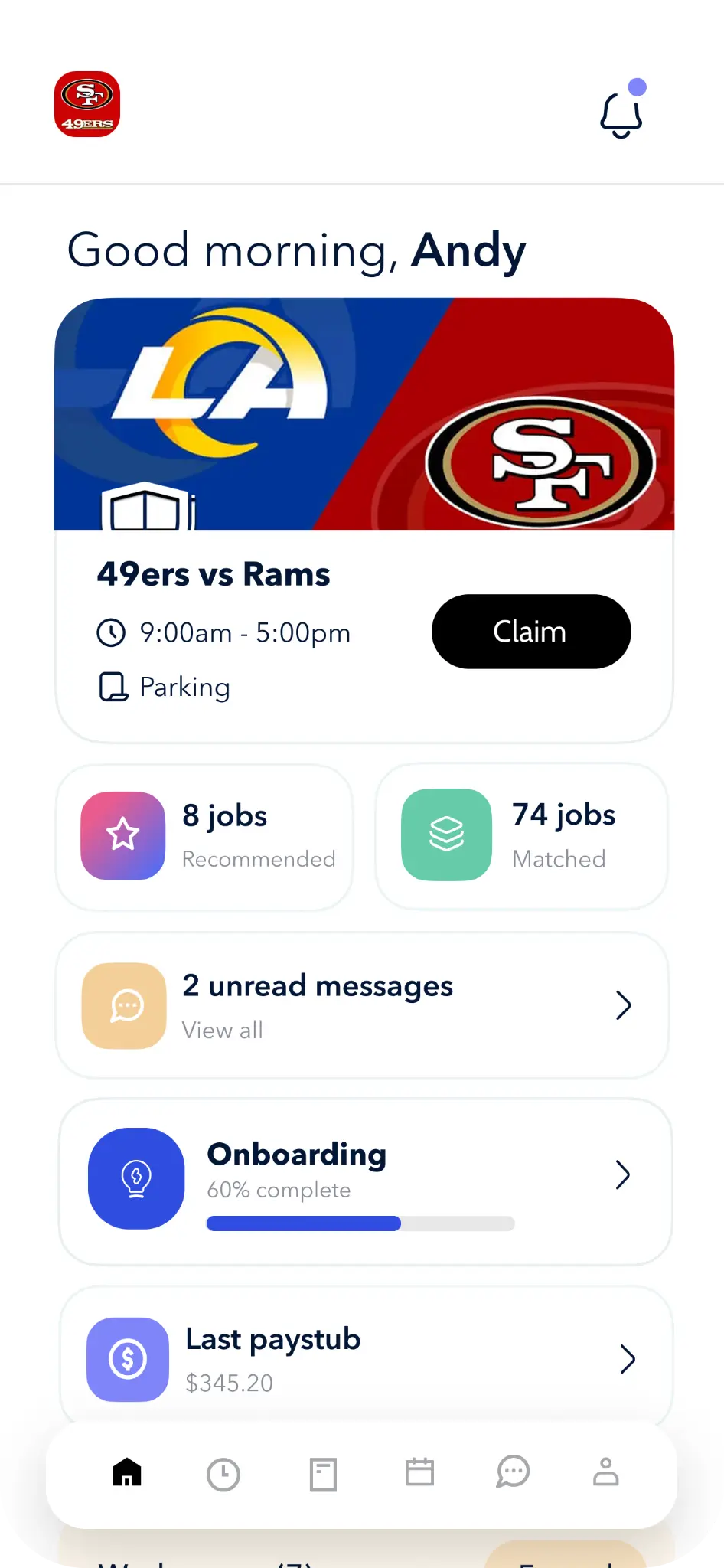
- Open shifts visible within two taps of opening the app
- Credential-aware filtering — a CNA doesn't see RN shifts, an unbadged guard doesn't see armed posts
- One-tap claim with automatic conflict checks against the worker's existing schedule
- Swap requests routed to qualified peers, not the whole roster
- Instant push when a request is approved or denied — no "check with your scheduler"
Contrast that with the status quo at most operators: a scheduler posts open shifts to a group text, ten workers reply "me," the first three names get the shifts, the rest find out an hour later. Two of them double-booked themselves with another agency in the meantime. One had an expired certification nobody caught. The scheduler spends Monday morning unwinding the mess.
This is the loop where credential rules earn their keep. Our Scheduling product enforces eligibility at the point of pickup, so a worker physically cannot claim a shift they're not qualified to run. The Mobile App surfaces only the shifts that match — no scrolling, no guessing, no scheduler call-back.

The shift-pickup test
Before you sign any workforce software contract, run this test on the vendor demo: open the worker app, find tomorrow's open shifts, claim one. Time it. If it takes more than 15 seconds, your workers won't use it. They'll keep using the group text — and you'll keep paying for software you can't audit.
Clock-In, Geofence, and Timecard Exceptions Without the Friday Cleanup
Time tracking is where mobile apps either earn their keep or get bypassed. Bypassed time tracking means buddy punches, missing breaks, and a payroll admin spending Thursday and Friday cleaning up exceptions instead of running payroll.
The baseline a modern app should hit:
- GPS-verified clock-in tied to the assigned site, with a geofence radius the operator controls
- Photo verification for high-trust environments (healthcare, security, controlled-access sites)
- Break enforcement that respects jurisdiction rules — California meal premiums work differently than Texas
- Exception surfacing at the punch, not on Friday afternoon
- Overtime warnings to the worker before the OT trigger, not after
That fifth point is where most platforms fail. They surface exceptions to the admin queue and let them pile up. By the time someone reviews them, the worker has gone home, the supervisor doesn't remember the shift, and the only way to resolve it is a guess.
A mobile app that pushes the exception back to the worker the moment it happens — "You missed your break punch at 12:14, tap to confirm or correct" — closes the loop in real time. Friday cleanup goes from four hours to twenty minutes. Our Time Tracking module is built around this principle: catch the exception at the punch, not at payroll.
| The old way | What a mobile-first app should do |
|---|---|
| Paper timecard signed at end of shift | GPS-verified clock-in/out with photo confirmation |
| Missed punches found Friday at payroll cutoff | Worker gets a push notification within minutes of the missed punch |
| Meal-break violations discovered in audit | Break enforcement triggers a prompt at the worker's required break window |
| Overtime caught after it's already incurred | Worker and supervisor warned before crossing the OT threshold |
| Edits routed through email and Slack | In-app edit requests with approval trail attached to the timecard |
This is also where compliance starts to compound. Meal break premiums, minor work-hour rules, predictive scheduling penalties — every one of them rides on whether the punch data is clean. If your app produces dirty data, your compliance posture is fiction.
Ready to move?
Ready to see Teambridge in action?
Credentials, Documents, and Onboarding in the Worker's Pocket
Expired licenses, missing I-9s, and lapsed certifications are the silent shift-killers in healthcare, security, and construction. The worker shows up, the facility checks the badge, the badge is expired, the shift is dead — and the operator eats the lost revenue plus the relationship hit.
A mobile app should make this category of failure mathematically impossible:
- Credential capture from the phone — photo upload, OCR of the document, automatic expiry parsing
- Push reminders at 60, 30, and 7 days before expiration
- Hard blocks on shift pickup the moment a credential lapses
- Document re-collection workflows that don't require an office visit
The same logic applies upstream to onboarding. Most operators still treat onboarding as an office activity: come in, sign papers, watch a video, get your badge. That's a relic of when the office was the only digital surface available. Each new hire triggers a set of federal and state compliance requirements: I-9 employment eligibility verification, W-4 withholding, required state notices, and industry-specific certifications. A restaurant hiring 15 new employees per year must run the full compliance process 15 times. Manual processing at this volume produces errors, missed deadlines, and legal exposure.
Pre-day-one onboarding on a mobile device fixes that. The worker downloads the app, completes their I-9 with photo capture of supporting documents, e-signs offer paperwork, watches required training videos, and uploads credentials — all before they walk into a facility. Our Onboarding module and Document Studio are built specifically for this flow. The worker shows up on day one ready to clock in, not ready to sign paperwork.
Tip
If your onboarding process requires the worker to be physically in the office before they can do anything productive, you're losing roughly the first 8 hours of their tenure to paperwork. Multiplied across a year of hires, that's a meaningful chunk of payroll spent on form completion.
Messaging That Replaces the Group Text (and the Personal-Phone Problem)
Frontline communication is where most workforce platforms quietly fail. They bolt on a generic chat feature, call it "engagement," and move on. The result is a tool nobody uses, while the real coordination happens in WhatsApp groups the operator can't see.
Start with the access problem. Only 23% of frontline workers have a corporate email account (Deloitte). Email-based comms are a non-starter for the other 77%. And the gap goes deeper — 83 percent of non-desk workers have no corporate email address, while 45 percent have no access to the company intranet at work.
So what should the messaging layer actually do?
- Structured around shifts, sites, and roles — not a free-for-all Slack clone where every conversation lives forever and nobody can find anything
- Broadcast announcements with read receipts for safety notices, policy changes, and compliance-sensitive content
- In-line translation for multilingual workforces — in industries like manufacturing and hospitality, teams often span multiple languages
- SMS fallback for workers who haven't installed the app yet or are on a shared device
- No corporate email required to log in — phone number is the identity
And then there's the BYOD reality. Workers are using their own phones, paying for their own data, and have approximately zero patience for an app that drains their battery or asks for permissions it doesn't need. More than 4 in 5 employees (82%) say they would use their personal phone for communication. This makes adopting channels like texting and mobile apps more accessible to companies. They will use a personal device — but they'll uninstall a bloated app the same day they install it.
The Communication module in our platform is built around this constraint. Push-first delivery, SMS fallback baked in, message routing tied to shift and site context, and a worker identity that doesn't require a company email address.

The Adoption Test: If It's Harder Than Paper, Workers Won't Use It
Here's the operator-blunt standard for any worker-facing app: if it's harder than paper, workers won't use it. They'll route around it. They'll go back to the group text. They'll find the supervisor and ask. And you'll be paying a per-seat license for software that nobody touches.
Concrete UX standards to demand before signing a contract:
- Any common action under 5 seconds — clock in, claim shift, send message, upload document
- Thumb-zone navigation — primary actions reachable with one hand
- Glove-compatible touch targets — construction, food service, cold storage all use gloves
- Daylight-readable contrast — workers are outside; the screen has to work in direct sun
- Offline-first sync — job sites lose signal; the app has to keep working and reconcile when reconnected
- Under 10 minutes of worker training — if it takes a training session, you've already lost
The AI layer is now table stakes — but only when it removes taps, not adds them. Voice-to-text for shift notes, smart shift recommendations based on past pickup patterns, proactive nudges when a credential is about to expire — these only earn their place if they shorten the worker's path to the thing they were trying to do.
The corollary: don't make the worker app the place where AI lives in the foreground. Our AI Platform runs Specialists in the background — autonomous agents that handle scheduling logic, no-show follow-ups, and compliance checks without forcing the worker to interact with a chatbot. The worker app stays simple. The intelligence sits underneath.
The barrier to frontline adoption is not motivation. It's access. According to McKinsey, companies that invest in better communication tools for frontline workers can see productivity improvements of 20–25%. The barrier is not motivation — it is access.
For more context on how the broader category is evolving, the team at Emergence Capital has tracked deskless software for years, and the gap they identified in 2020 — that for the 80% of the global workforce that does not work behind a desk, technology is increasingly being valued for boosting productivity and improving job satisfaction. Yet, the availability of appropriately-suited technologies continue to under-serve this forgotten workforce — has narrowed, but not closed.
What to Ask a Vendor Before You Roll Out a Workforce App
The sales demo will always look good. Here's the operator checklist that actually predicts whether the app will survive contact with your workforce.
- Does it work offline at a job site with no signal? Open the app in airplane mode. Try to clock in. Try to read your schedule. If either fails, walk away.
- Can it enforce credential rules on shift pickup? Ask the vendor to demo an unqualified worker attempting to claim a shift. The app should block it — not warn the scheduler later.
- Does it push payroll-ready time data without a manual cleanup queue? Ask to see the exception queue in a production account. If it's full of week-old items, the platform is producing dirty data.
- Can a worker complete onboarding without ever calling the office? Document upload, e-sign, training, credential capture — all from the phone, all before day one.
- Does it support BYOD without exposing personal data? Workers will use their own phones. The app should not require device management or expose location data outside of clock-in events.
- Does it have an SMS fallback for workers who haven't installed the app yet? Coverage gaps in the first 30 days of employment are where most operators lose visibility.
- Can the worker app stay simple while AI runs underneath? If the demo features a chatbot the worker has to talk to, the platform is making the worker do the work the software should be doing.
Run every vendor through that list. The ones that pass will be a short list. The Teambridge platform was built to pass it — scheduling, time tracking, onboarding, communication, and AI Specialists running in one system, with the Mobile App as the worker's single surface.
The 1% problem isn't going to close by itself. But it does close — one operator at a time — when someone in the building decides that the people doing the work deserve software that respects their hands, their time, and their phone battery.

About the author

Content Writer at Teambridge
Anis Nanai is a content writer at Teambridge, with a focus on workforce management and the realities of running hourly teams. He prioritizes conversations with customers, staying close to the market, and understanding how workforce needs are changing. His writing connects those concerns to practical decisions about scheduling, time tracking, staffing, and automation. He examines product developments through the questions that matter to operators: what does this solve, how would it work for my team, and what evidence supports it?
Company perspective: this author works at Teambridge. Customer outcomes are attributed to their published sources.
View LinkedIn profile