

The gap between operators who treat AI as a real operating layer and operators who treat it as a feature on a roadmap is widening fast. The latter group is quietly absorbing 10 to 15 percent more labor cost than the former — not from any single failure, but from the compounded drag of manual fills, late compliance catches, and overtime that nobody saw coming.
The Hourly Ops Problem AI Is Actually Solving
Walk into any staffing agency, janitorial operation, or hospital float pool at 5 a.m. and the picture looks the same: a dispatcher juggling SMS threads, a spreadsheet of available workers, a separate credential tracker that may or may not be current, and a client account manager already asking about coverage. The tooling under most hourly operations was built for a world where 50 workers got a printed schedule on Friday.
The pressure to fix this is no longer theoretical. SHRM's 2026 CHRO Priorities and Perspectives report shows 92% of CHROs anticipate that AI will be further integrated into the workforce this year, and 87% forecast greater adoption of AI within HR processes, up from 83% in 2025. And it is not just intent — 62% of organizations are currently deploying AI somewhere in their operations, with 39% having already adopted it within the HR function itself.
The catch: frontline-heavy industries lag the enterprise average. Workforce management tools designed for salaried desk workers do not handle the chaos of shift work — last-minute call-outs, credential lapses, multi-site coordination, and labor-law variation by city. That gap is where the cost lives.
Note
When we talk about "AI in hourly ops" in this piece, we mean autonomous execution of operational work — not dashboards, not chatbots, not autofill buttons. The distinction matters because it explains why the ROI numbers are so different from generic "AI productivity" claims.
Automated Shift Scheduling: What "AI Scheduling" Means in Practice
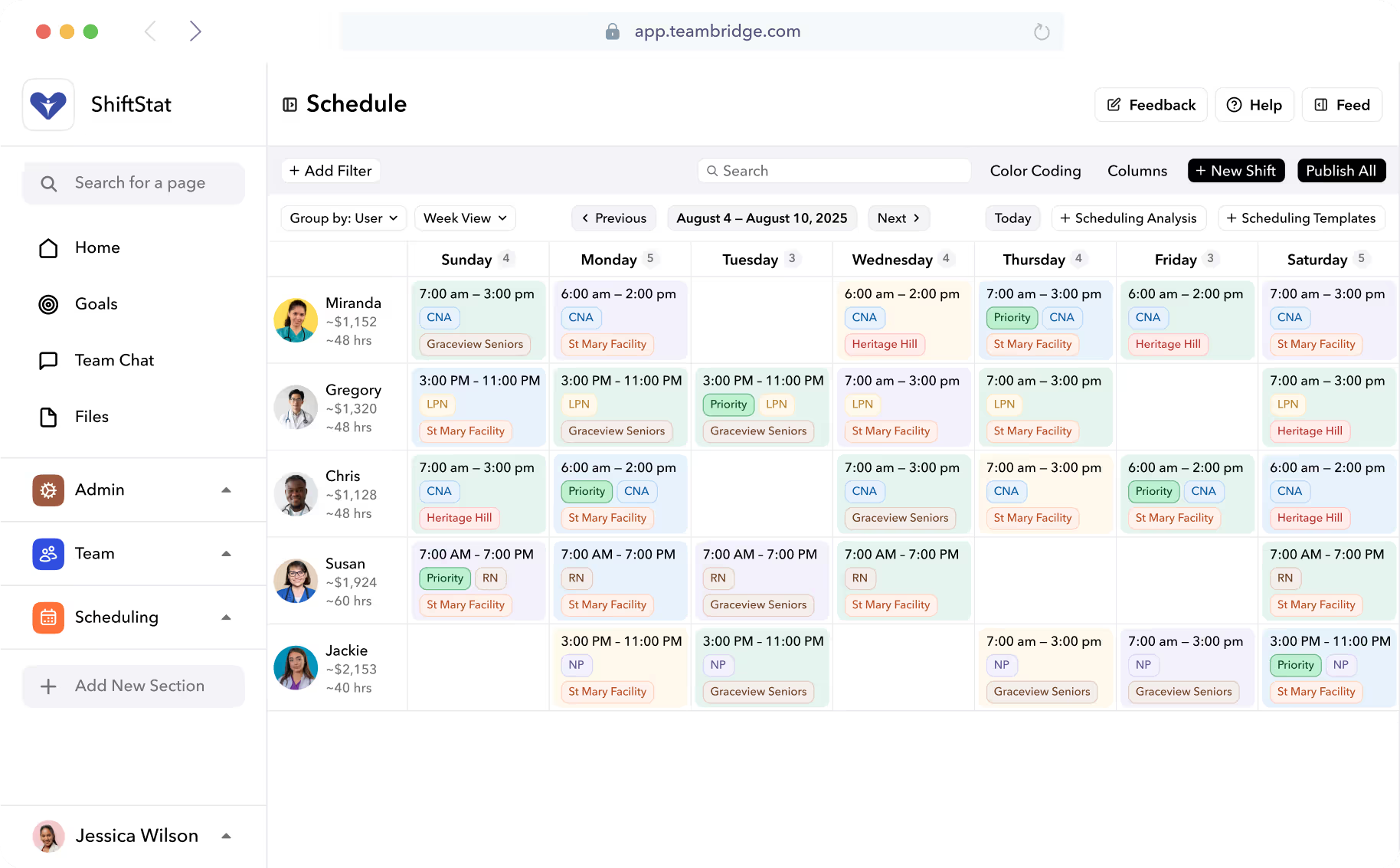
Most "AI scheduling" pitches collapse under inspection. Drag-and-drop with an autofill button is not AI scheduling. Real automated shift scheduling weighs availability, skills, certifications, labor law, fatigue rules, and demand forecasts simultaneously — and prices the schedule in dollars before you publish it.
The measurable outcomes are consistent across the market. Most organizations implementing AI scheduling report labor cost reductions of 5-15% within the first year. AI scheduling can reduce overtime expenses by 20-30% through optimized staff distribution and proactive management. Smaller operations see the time savings first: small organizations typically benefit from 30-50% time savings on administrative scheduling tasks before the labor-cost line moves.
The mechanics behind those numbers:
- Demand forecasting from historical data. The system reads patterns — by hour, by site, by season — and proposes headcount that matches actual demand instead of a static template.
- Fatigue and rest-rule enforcement. Back-to-back shifts, sub-8-hour turnarounds, weekly hour caps. The engine refuses to assign them.
- Real-time labor cost projection. Before publish, the operator sees the dollar total — including projected overtime — and can adjust.
- Skill and credential matching. A worker without an active food-handler card cannot be assigned to a kitchen post. The block happens at assignment time, not after.
This is what Teambridge Scheduling does for staffing agencies, healthcare operators, and facilities companies — it builds the schedule the dispatcher would have built if they had ten hours and perfect data.

Real-Time Compliance Checks Replace the Quarterly Audit Panic
Compliance in hourly ops used to be a backward-looking exercise. Quarterly audit, find the violations, write the apology email, pay the fine. That model is dead in 2026 for two reasons: regulators got more aggressive, and the technology to enforce rules at the moment of scheduling is now standard.
The regulatory pressure is real and global. The EU AI Act entered into force on 1 August 2024, establishing a risk-based framework for AI use across the EU. Since 2 February 2025, certain AI practices in the workplace have been outright banned, including emotion recognition during hiring interviews and biometric categorization of candidates. The pivotal compliance deadline for HR is 2 August 2026, when the full suite of high-risk system obligations becomes enforceable for all employment-related AI, covering recruitment, screening, and more. In the US, predictive scheduling and Fair Workweek laws keep expanding city by city.
A modern rule engine catches the conflict before publish:
| Compliance Risk | Old Model (Quarterly Audit) | AI-Enforced Model |
|---|---|---|
| Expired food handler card | Found in audit, worker pulled, fine paid | Worker is invisible in the assignment pool until renewal |
| Sub-10-hour shift turnaround | Caught in payroll reconciliation | Schedule will not save with the violation |
| Fair Workweek 14-day notice | Manager remembers, or doesn't | Auto-published two weeks out, premium pay calculated if changed |
| Union seniority bidding | Disputed after the fact | Bid window enforced before assignment |
| Minor work-hour limits | Found by parent complaint | Hard block in the scheduling engine |
The credential side is where most operators bleed quietly. A nurse with a lapsed BLS, a security guard with an expired state license, a janitor missing the required asbestos training — every one of those is both a compliance hit and a client-trust hit when discovered. Teambridge Automations handles this on a calendar: the system pings the worker 60, 30, and 7 days out, escalates to the supervisor if the cert is not refreshed, and removes the worker from eligible shifts the day the credential expires.
Important
If your compliance "system" is a shared spreadsheet, you are absorbing fines you can't see. The cost is not the fines you paid — it is the contracts you didn't win because the prospect asked about audit readiness and your sales engineer hesitated.
Intelligent Onboarding: Why Day One Should Be the Fifth Day, Not the First
Hourly onboarding bleeds money in places most operators never measure. Workers ghost between the offer and the first shift. I-9s sit unsigned. Scrubs, badges, and required training are not done by start time, so the worker shows up and stands around — billed at $0 to the client and $X to your payroll.
The fix is not a faster form. It is sequencing the entire pre-day-one process asynchronously so the worker walks in cleared. AI-driven onboarding chases the documents, schedules the training, verifies the credentials, and confirms the equipment is ready — without a recruiter babysitting the queue.
The outcomes operators report:
- Faster time-to-first-shift. A worker hired Monday can clear by Wednesday instead of next Monday.
- Fewer first-week no-shows. Workers who complete onboarding before day one show up at materially higher rates than those still chasing paperwork.
- Lower scheduler workload. The dispatcher stops being the document-chaser.
- Cleaner credential data going into scheduling. Bad data into the scheduling engine produces bad schedules; clean onboarding fixes the upstream problem.
The Agent Layer: From Dashboards to Autonomous Workforce Operations
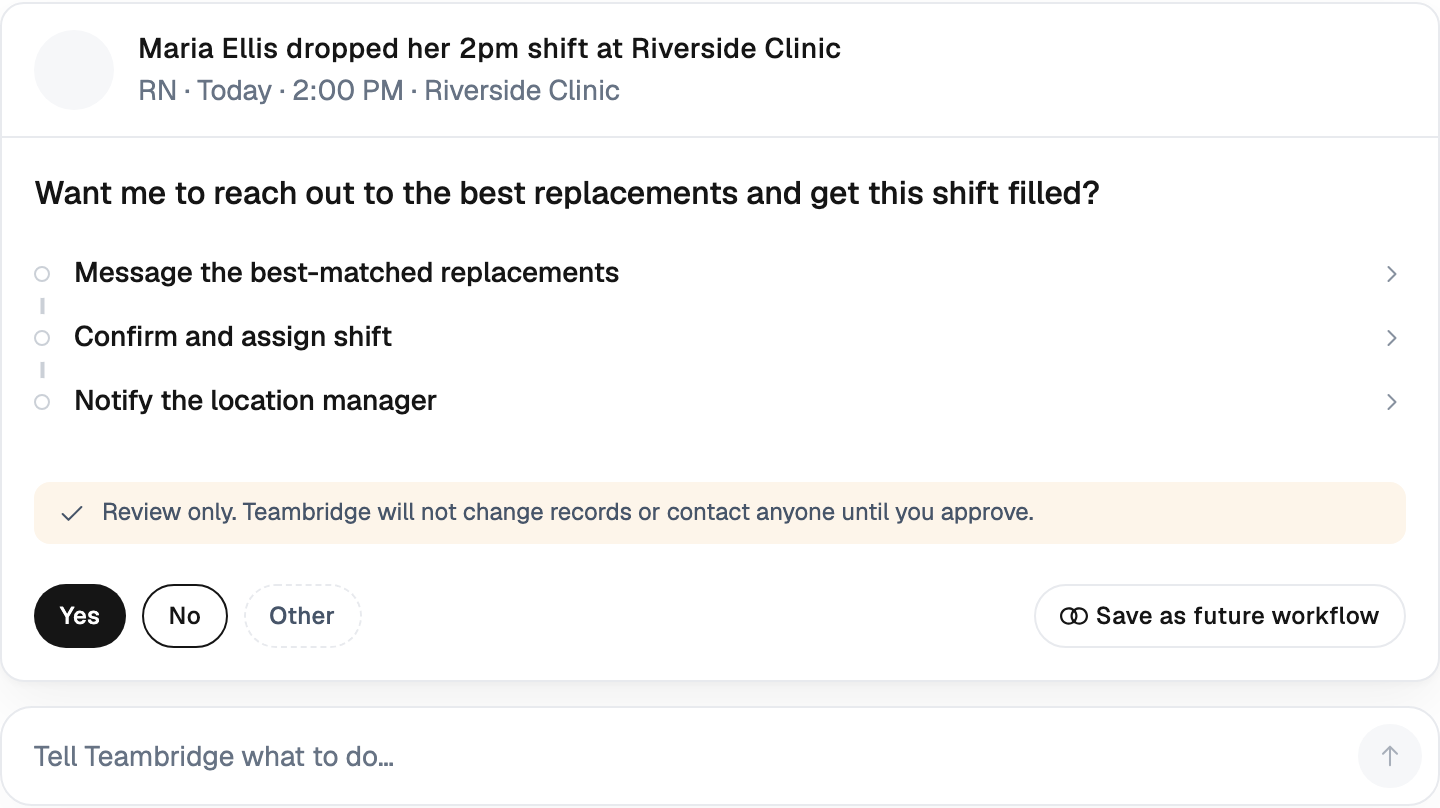
Here is the 2026 shift in one sentence: the AI worth paying for does the work, it does not show you the work that needs doing.
For a decade, workforce "AI" meant prettier dashboards and a recommendation panel that flagged risk. Useful, but it still required a human to act. The agent layer changes that. A significant emerging dimension is the rise of agentic AI in workforce management. According to Korn Ferry, more than half of talent leaders are already planning to add autonomous AI agents to their teams in 2026: a shift from using AI to assist HR professionals to deploying AI as an active participant in workforce operations.
In practice, an agent stack for hourly ops looks like a set of specialists:
- An agent that watches open shifts, ranks qualified workers, and texts or calls them in priority order until the shift is filled.
- An agent that pulls timecard exceptions — missed punches, geofence anomalies, overlapping clock-ins — and resolves them with the worker before payroll runs.
- An agent that monitors credential expirations and runs the renewal workflow end-to-end.
- An agent that drafts the client-facing schedule update when a shift changes, and waits for an account manager's one-click approval.
This is what Teambridge AI Specialists do continuously in the background. The dispatcher does not log in to see "4 shifts need attention." They log in to see "4 shifts were filled overnight, here is the audit log."
The macro forecast aligns. According to a Gartner press release, through 2026, 20% of organizations will use AI to flatten their organizational structure, eliminating more than half of current middle management positions. Organizations that deploy AI to eliminate middle management human workers will be able to capitalize on reduced labor costs in the short-term and long-term benefits savings. AI deployment will also allow for enhanced productivity and increased span of control by automating scheduling tasks, reporting, and performance monitoring for the remaining workforce. In hourly ops, that middle layer is the back-office coordination work — and it is the first thing agents absorb.
Labor Cost Reduction: Where the 10-15% Actually Comes From
Operators rightly want the math. "Labor cost down 12%" is meaningless without a teardown. Here is where it actually comes from for a typical hourly operation.
The four levers
- Overtime suppression. Real-time alerts during scheduling, not after payroll. Practices typically see 20-30% reduction in overtime costs within the first six months, primarily through better demand prediction and proactive schedule optimization.
- Overstaffing elimination. Demand-matched headcount by hour replaces the "schedule 12 because we always schedule 12" reflex.
- No-show reduction. Agents that confirm shifts the night before, escalate when a worker goes silent, and pre-stage backups cut day-of fire drills sharply.
- Reclaimed admin hours. Schedulers move from 25-30 hours a week building and patching schedules to 5-8 hours reviewing AI output.
A worked example: 500-worker janitorial operation
Assume a 500-worker janitorial company with $18M annual direct labor. A 12% labor cost reduction is $2.16M. Where does it come from?
| Lever | Contribution | Dollars |
|---|---|---|
| Overtime suppression (25% of overtime cut) | ~4% of labor | $720K |
| Overstaffing elimination | ~5% of labor | $900K |
| No-show / fill-time recovery | ~2% of labor | $360K |
| Scheduler admin hours reclaimed | ~1% of labor | $180K |
| Total | ~12% | $2.16M |
The individual percentages are conservative against the market data — businesses using AI-driven scheduling have reported cost reductions of 15-20% by ensuring the right number of employees work during peak hours without overstaffing during slower periods. Most operators see the overstaffing line move first because it is the easiest to measure and the hardest to defend politically without data.
This is the math we walk through with operators in janitorial and facilities and staffing agency deals. The numbers are not theoretical; they are reconstructable from the customer's own timecards once the system runs in shadow mode for a month.

Where AI Still Fails in Hourly Ops — and How to Avoid It
Operator-honest section. The majority of AI initiatives in workforce settings fail, and they fail in predictable ways. The biggest barriers to AI adoption are organizational, not technological. While experimentation is widespread, scaling remains difficult. The top challenges cited include employee fear of job loss, budget and investment constraints, and data, security, legal, and compliance concerns.
The failure modes in hourly ops specifically:
- Schedulers do not trust the recommendations. If the AI proposes a fill from a worker the dispatcher "knows" is unreliable, and there is no way to see why the AI picked them, the dispatcher overrides. Trust dies in two weeks.
- Frontline workers are not enabled. The office team uses the AI; the workers still get SMS from a personal phone. Adoption stalls at the office wall — the "silicon ceiling" — and the data the AI needs never gets clean.
- Bad data in, bad schedules out. Stale availability, unverified skills, expired credentials marked active. The AI is honest about its inputs; if the inputs are garbage, the schedule is garbage.
- No measurement of scheduler time saved. The deployment is judged on labor cost in month one, when it should be judged on hours reclaimed for the scheduler in month one and labor cost in month three.
Warning
Do not start an AI workforce deployment by promising the CFO a labor-cost number in 30 days. Start by measuring scheduler hours and exception queues. The cost line moves three to six months later, once the data is clean and the agents are trusted to act.
A practical checklist before turning agents on:
- Audit credential data. Pull every worker, every credential, every expiration date. If it is wrong, fix it before go-live.
- Run AI in shadow mode for two to four weeks. The agent proposes, the human approves. Measure agreement rate.
- Define what the dispatcher does with their reclaimed time before the project starts. "Be more strategic" is not a plan.
- Pick one site or one client to start. Cross-organization rollouts fail more often than they succeed.
What to Demand From an AI Workforce Platform in 2026
The market is crowded with tools that bolt an AI label onto a 2018 scheduler. The non-negotiables for an operator buying in 2026:
- Agentic execution, not just suggestions. If the platform shows you a recommendation and waits for you to click, it is a 2022 product.
- Native compliance rule engine. Credential rules, jurisdictional labor law, fatigue rules, union rules — enforced at scheduling time. Not a separate compliance dashboard.
- Real-time labor cost visibility at the point of scheduling. Dollars before publish, not after payroll.
- Full audit trail of every AI decision. Who got called, in what order, why. Required for client audits, EU AI Act readiness, and internal trust.
- Native integration with payroll, time tracking, communication, and onboarding. Bolt-on tools create new exception queues — the opposite of what the AI is supposed to eliminate.
This last point is the one most operators get wrong. Buying a best-of-breed AI scheduler that does not talk to your time tracking creates a reconciliation tax that consumes the savings. The unified-platform argument is not a vendor preference — it is the only architecture in which agents can actually act across the workflow.
For a teardown of how this stack fits together, see The Teambridge Platform and our AI Platform. The honest version of "AI workforce management" in 2026 is not one feature. It is a single system where scheduling, time, pay, compliance, and communication share data, and agents work across all of them on your behalf.
The operators making this shift in 2026 will not be the ones with the loudest AI marketing. They will be the ones whose schedulers go home at 5 p.m., whose credential audits pass without a panic, and whose labor line is 10-15% lower than the operator across town doing the same work.

About the author

Content Writer at Teambridge
Anis Nanai is a content writer at Teambridge, with a focus on workforce management and the realities of running hourly teams. He prioritizes conversations with customers, staying close to the market, and understanding how workforce needs are changing. His writing connects those concerns to practical decisions about scheduling, time tracking, staffing, and automation. He examines product developments through the questions that matter to operators: what does this solve, how would it work for my team, and what evidence supports it?
Company perspective: this author works at Teambridge. Customer outcomes are attributed to their published sources.
View LinkedIn profile