

Reviewed August 2026
2026 buyer update: compare operating systems, not checklists
A workforce management app can mean a scheduling tool, time clock, HR suite, payroll product, communication app, or a broader operating platform. Start by defining which system owns each decision and record. Then test how the complete workflow crosses those boundaries.
Manager workflow
Follow demand through scheduling, readiness checks, communication, exceptions, approvals, and reporting in one realistic scenario.
Frontline workflow
Test schedule access, shift actions, documents, messages, time capture, and support on the devices workers actually use.
Configuration depth
Determine whether your team can change fields, permissions, rules, views, forms, and automations as operations evolve.
Exception handling
Test call outs, missed punches, expired credentials, unfilled shifts, rejected documents, and corrected timecards.
Integration reality
Verify direction, frequency, mapped objects, ownership, failure handling, and setup work for every important connection.
Implementation fit
Score migration, configuration, training, governance, mobile adoption, support, and time to the first useful workflow.
Product boundary
Teambridge is a configurable workforce operations platform for scheduling, time, communication, documents, onboarding, invoicing, and connected workflows. It is not a payroll processor, benefits platform, general ledger, electronic health record, or universal replacement for every HR system.
Are you facing challenges with employee scheduling, time tracking, or optimizing your team’s productivity?
Workforce management software might be the solution you’re looking for. These platforms simplify complex scheduling processes, streamline time-tracking, and provide valuable insights into labor efficiency and productivity.
In this article, we take a deep look at the top 4 workforce management software options for 2025, examining each tool’s unique features, advantages, and how they can support your business goals.
Whether you’re aiming to reduce administrative tasks, improve compliance, or boost employee engagement, these software solutions are designed to meet the evolving needs of today’s workforce.
Read on to discover which platform best aligns with your organization’s goals and can help you effectively manage labor resources in 2025 and beyond.
Primary Functions of a Workforce Management System
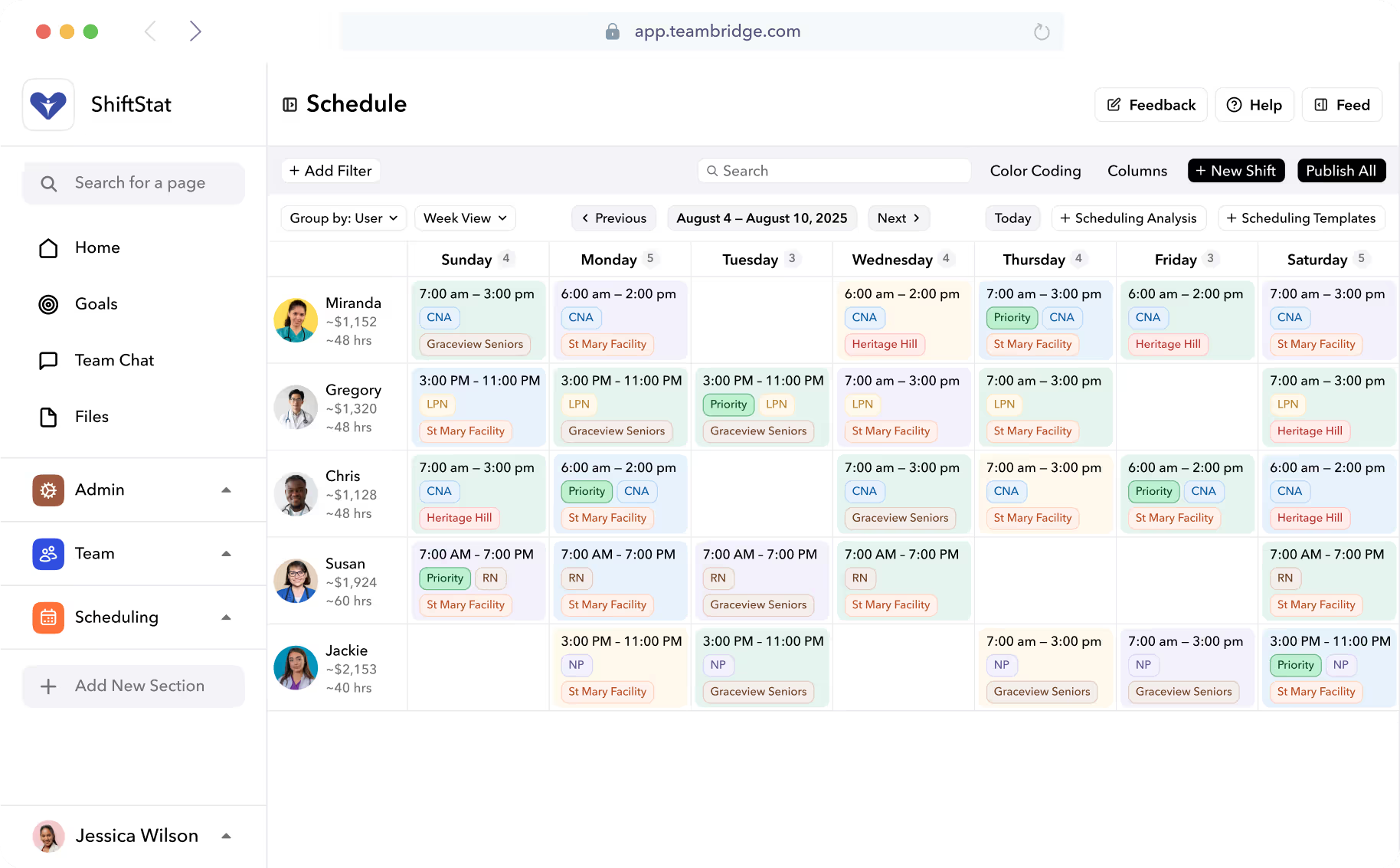
One of the primary functions of these apps is to manage employee scheduling. This involves creating schedules by departments, jobs, or locations, which helps streamline the scheduling process and ensures that all shifts are adequately covered.
Additionally, these apps assist in processing timesheets, forecasting labor needs, decreasing staffing expenses, and tracking absences, which are all crucial components of a comprehensive workforce management solution.
Workforce tools equip HR managers with data and insights to make informed decisions about workforce planning and management. Using these tools, organizations can boost workforce skills, comply with laws, and enhance employee performance and satisfaction.
Key Metrics and Features WFM Software
Employee Scheduling
- Create schedules by department, job, or location to better manage time
- Streamline scheduling for full shift coverage
- Ideal for managing dispersed or remote teams by considering employee availability
Time Tracking
- Monitor employee attendance and accurately record work hours for day to day operations
- Up to date visibility into attendance data for better scheduling and labor decisions
- Helps with labor regulation compliance and reduces legal risks
Absence Monitoring
- Track time-off balances and manage extended leave requests
- Self-service PTO management for employees via a user-friendly interface
- Enhances employee engagement and supports productivity
Labor Forecasting and Analytics
- Predict staffing requirements using historical data and trends for talent acquisition and more
- Prepare for demand spikes with labor forecasting tools
- Real-time metrics for managers to monitor and boost productivity
Automated Workflows for Compliance
- Simplify compliance with complex leave laws and verify eligibility
- Automated processes increase productivity and ensure regulatory compliance
8 Benefits of Using Workforce Tools
- Enhance operations and productivity by aligning employee skills with tasks
- Automate routine administrative tasks, allowing HR to focus on strategic activities and streamlining processes
- Reduce labor costs by accurately forecasting staffing needs and maintaining optimal workforce levels
- Improve compliance with all laws, minimizing legal risks
- Encourage employees to better engage through transparency and communication
- Empower employees with self-service options for PTO management and flexible scheduling
- Enable data-driven decision-making with performance analytics for payroll, benefits talent management, and retention throughout the entire process
- Streamline operations and elevate organizational productivity to meet the needs of the workforce and key stakeholders
Top 4 Workforce Management Software for 2025
With the variety of workforce management apps available, choosing the right one can be overwhelming. We’ve narrowed down the top four solutions for 2025, each offering unique features to enhance productivity, streamline processes, and improve employee engagement.
| Feature | Teambridge | Rippling | Connecteam | Paycom |
| Seamless scheduling | ||||
| Real-time time tracking | ||||
| Data-driven insights | ||||
| Advanced labor forecasting | ||||
| HR core functions | ||||
| Compliance features | ||||
| Employee self-service (PTO) | ||||
| Scalable for business growth | ||||
| Intuitive interface |
App #1: Teambridge

Screenshot of Teambridge website home page
As the number one choice, Teambridge was designed to improve productivity through seamless scheduling, real-time monitoring, and data-driven insights. This app stands out for its user-friendly interface, making it easy for managers to create and modify schedules while ensuring accurate time tracking and attendance management.
TeamBridge’s comprehensive tools also include advanced labor forecasting, core HR functions, and compliance features, helping organizations stay aligned with labor regulations effortlessly.
With self-service options for employees, such as PTO management and flexible scheduling requests, TeamBridge fosters an engaging work environment that boosts employee morale and satisfaction.
Trusted by businesses of all sizes, TeamBridge provides a scalable solution that grows alongside your organization’s needs, delivering unmatched efficiency and workforce optimization. It is suitable for all performance management tasks and the whole workforce.
Key Features:
- Seamless scheduling with easy modifications
- Real-time tracking for accurate time and attendance
- Advanced labor predictions for resource optimization
- Compliance tools to stay aligned with regulations
- Self-service PTO and flexible scheduling
App #2: Rippling

Screenshot of Rippling website home page
Rippling combines workforce management with core HR functions, including payroll, benefits, and compliance. Its intuitive interface allows for smooth employee scheduling, time tracking, and even onboarding, making it an all-in-one solution.
Key Features:
- Unified platform for HR, IT, and workforce management
- Advanced scheduling and labor forecasting
- Built-in compliance tools for local and federal regulations
- Detailed insights for data-driven decisions
App #3: Connecteam

Screenshot of Connecteam website home page
Connecteam focuses on mobile-first workforce management, making it ideal for deskless teams. It offers features like scheduling, task management, and communication, all accessible from a user-friendly mobile app.
Key Features:
- Mobile-first design for easy access on the go
- Schedule creation with notifications for updates
- Direct messaging and group chats for communication
- Self-service PTO requests and shift swaps
App #4: Paycom

Screenshot of Paycom website home page
Paycom offers a comprehensive workforce management solution with an emphasis on payroll and HR compliance. Its platform supports employee self-service, time tracking, and reporting, making it a valuable tool for HR operations.
Key Features:
- Integrated payroll and time tracking for accuracy
- Robust compliance features to meet labor standards
- Employee self-service for PTO and availability updates
- Reporting and analytics for workforce insights
How to Choose the Right WFM Software
When selecting a workforce management app, consider these factors:
- Define Goals and Challenges: Understand your specific needs to find a solution that addresses your organization’s requirements.
- Evaluate Vendor Reputation: Research user reviews and testimonials to assess reliability.
- Prioritize User Experience: Choose a user-friendly app that your team will adopt easily.
- Consider Cost: Factor in initial and ongoing costs to ensure good value.
- Opt for a Unified System: Look for apps that integrate payroll, scheduling, and attendance for streamlined processes.
Integration of WFM Software with Existing Systems
Integrating management apps with existing systems is essential for a seamless operational process. Effective integration prevents inefficiencies and improves workflow by ensuring all software tools communicate effectively. This is crucial for organizations with complex tech stacks, ensuring all aspects of workforce management are aligned and functioning smoothly.
Industry Considerations
For industries like healthcare, workforce and time management apps can facilitate the scheduling of healthcare professionals, aiding compliance with specific industry regulations. This capability is critical for maintaining operational efficiency and ensuring that all shifts are adequately covered.
Review the existing tech stack and ensure compatibility with core and HR management functions before purchasing new employee management software. This will help avoid potential integration issues and ensure that the new software enhances, rather than disrupts, existing processes. The app should be a comprehensive HR SaaS product to meet the needs of businesses of all sizes.
Trends in Labor Management Apps for 2025
The workforce management landscape is constantly evolving, and 2025 is no exception. A significant trend is the incorporation of AI in workforce tools. AI can enhance operational efficiency and employee satisfaction by automating routine tasks, predicting staffing requirements, and providing personalized insights. This trend is expected to revolutionize workforce planning and management, improving productivity and employee engagement.
Another trend is the increasing focus on data security. Ensuring the security of workforce data is paramount as organizations adopt mobile devices workforce management software solutions. Enhanced data security measures are being integrated into workforce management systems to protect sensitive information and comply with data protection regulations.
What About a Mobile First Design?
Mobile-first design is gaining traction, improving communication and engagement among remote teams. With more organizations embracing remote work, a workforce management software prioritizing mobile devices functionality can significantly enhance the employee experience. These apps enable employees to access schedules, request time off, and communicate with managers from anywhere, ensuring they remain connected and engaged.
Workforce management software increasingly supports project staffing by monitoring time and productivity for project compliance. This capability allows organizations to allocate resources more effectively, ensuring projects are completed on time and within budget. These trends highlight the dynamic nature of the workforce management industry and continuous innovation aimed at enhancing efficiency, workforce safety, and productivity.
Implementation Best Practices of WFM Software
Implementing a workforce management software can be complex, but following best practices ensures a smooth transition and maximizes benefits. Start the onboarding process before the employee’s first day. This eases their transition into the work life balance of the company and familiarizes them with the tools and processes they will be using.
Personalizing the employee onboarding experience improves engagement by making new hires feel welcomed and recognized. Gathering input from new hires and existing staff tailors the onboarding process to meet real needs and address negative preconceptions about training. Pairing new employees with experienced colleagues provides practical insights into the company and eases their adjustment.
A resource library with easily accessible training materials supports new hires when they face on-the-job challenges. Providing a flexible training timeline allows new employees to manage their learning pace without feeling pressured. Using mixed content types in training keeps new hires interested and aids information retention. Certification courses can help track the progress and performance of new employees effectively.
Creating a safe environment for new employees to learn from mistakes fosters confidence and skill development. Encouraging social learning through peer interactions enhances new hires’ integration into the company culture. Following these best practices ensures a successful implementation of compensation management of the workforce system and enhances overall operational efficiency.
Challenges and Solutions in Using Workforce Management Apps
While workforce management software offers numerous benefits, their implementation and use can come with challenges. One significant challenge is the setup and data migration process. Organizations must effectively transition existing employee data to the new system to avoid disruptions. This requires careful planning and execution to ensure that all data is accurately transferred and integrated.
Manual time entry tools can also pose challenges, especially for remote teams. Inaccurate time monitoring can lead to decreased productivity and errors in recorded work hours. To address this, organizations can implement automated time monitoring solutions that ensure accuracy and reduce the burden on employees.
Compliance with labor laws is another challenge that organizations must navigate. As labor laws become increasingly complex, noncompliance can result in legal repercussions. Workforce management software can help by automating compliance processes and ensuring that all labor regulations are adhered to.
Staff adoption can also be a hurdle when implementing new workforce management tools. It’s essential to provide comprehensive training and support to ensure that all employees are comfortable using the new system. By addressing these challenges head-on and providing the necessary human resources to, organizations can reap the full benefits of their workforce management software solutions.
Takeaways on Workforce Management Apps
Workforce management apps are essential tools for modern organizations aiming to improve productivity, streamline operations, and enhance employee satisfaction. By leveraging these tools, businesses can optimize workforce planning, comply with labor laws, and make informed decisions based on real-time data.
Embrace the future of workforce management and unlock your organization’s full potential with the right app.
Frequently Asked Questions
What are the key features to look for in a workforce management software?
When selecting a workforce management software, prioritize features such as scheduling of employees, time tracking, absence management, labor forecasting, and compliance management. Additionally, consider advanced capabilities like real-time visibility and analytics for improved productivity and informed decision-making.
How can WFM software improve employee participation?
Workforce and time management apps enhance employee participation by promoting transparency and communication, while also offering flexible scheduling and self-service tools for time management. These capabilities empower employees, leading to a more positive work environment.
What should I consider when choosing a workforce management software?
It is essential to evaluate your specific goals and challenges, assess the vendor’s reputation, prioritize user experience, and determine cost and compatibility with existing systems. A suitable workforce management software should effectively address your needs while remaining user-friendly.
How do workforce management apps help with compliance?
Labor management apps enhance compliance by automating labor law processes, ensuring accurate time tracking, and efficiently managing overlapping leave laws. This ultimately reduces the risk of legal issues and helps organizations adhere to relevant regulations.

Put this research into operation
Create a practical mobile app brief around worker actions, manager controls, integrations, and support requirements. mobile workforce app brief generator.
Connect schedules, open work, onboarding, tasks, time, documents, and messages in one worker mobile experience. mobile workforce management software.
Separate a standalone employee app from the platform that coordinates scheduling, time, communication, and operations. AI workforce management platform.
Compare software choices against the operating model and measures used by distributed hourly teams. 2026 United States Workforce Management Report.
About the author

Content Writer at Teambridge
Anis Nanai is a content writer at Teambridge, with a focus on workforce management and the realities of running hourly teams. He prioritizes conversations with customers, staying close to the market, and understanding how workforce needs are changing. His writing connects those concerns to practical decisions about scheduling, time tracking, staffing, and automation. He examines product developments through the questions that matter to operators: what does this solve, how would it work for my team, and what evidence supports it?
Company perspective: this author works at Teambridge. Customer outcomes are attributed to their published sources.
View LinkedIn profile