

The gap is starting to show up in operating numbers: longer time-to-fill, thinner margins on placements, and quiet client churn that gets blamed on "service" when it's really a data problem. This guide walks through what actually breaks, what to look for in a purpose-built platform, and the operational math agencies see when they stop stitching tools together.
Why Staffing Agencies Break Generic WFM Tools
A standard WFM tool assumes a single employer-of-record. One pay calendar. One overtime policy. One set of approvers. One geography. Staffing agencies operate the opposite way — one worker might pick up a warehouse shift Monday at $19/hr with OSHA 10 required, a healthcare shift Wednesday at $34/hr with BLS and a TB test required, and an event shift Saturday at $22/hr with a different bill rate and a client-specific dress code.
Multi-location is not the same as multi-client. A retail chain with 80 stores still has one HR policy. A staffing agency with 80 clients has 80 contracts, 80 credential matrices, and 80 invoicing rules. Tools built for the first scenario quietly fall over in the second.
Meanwhile, the technology bar is rising fast. 61% of staffing firms already use AI, up from 48% in 2024, with 74% of non-users planning adoption — potentially reaching 75% industry-wide by year-end. The data shows that agencies still focused on traditional methods are falling behind, while fast-growth agencies are leading the charge with higher adoption rates and more strategic implementation.
Most of those fast-growth agencies aren't running ATS + spreadsheets + group texts anymore. The ones still doing that are losing renewals to operators with cleaner data and faster fill times. This article focuses on the four areas where that gap shows up first:
- Time-to-fill on open shifts
- Worker communication at scale
- Compliance across many client sites
- Client-facing visibility and reporting
Time-to-Fill: What Actually Slows Down Open Shift Coverage
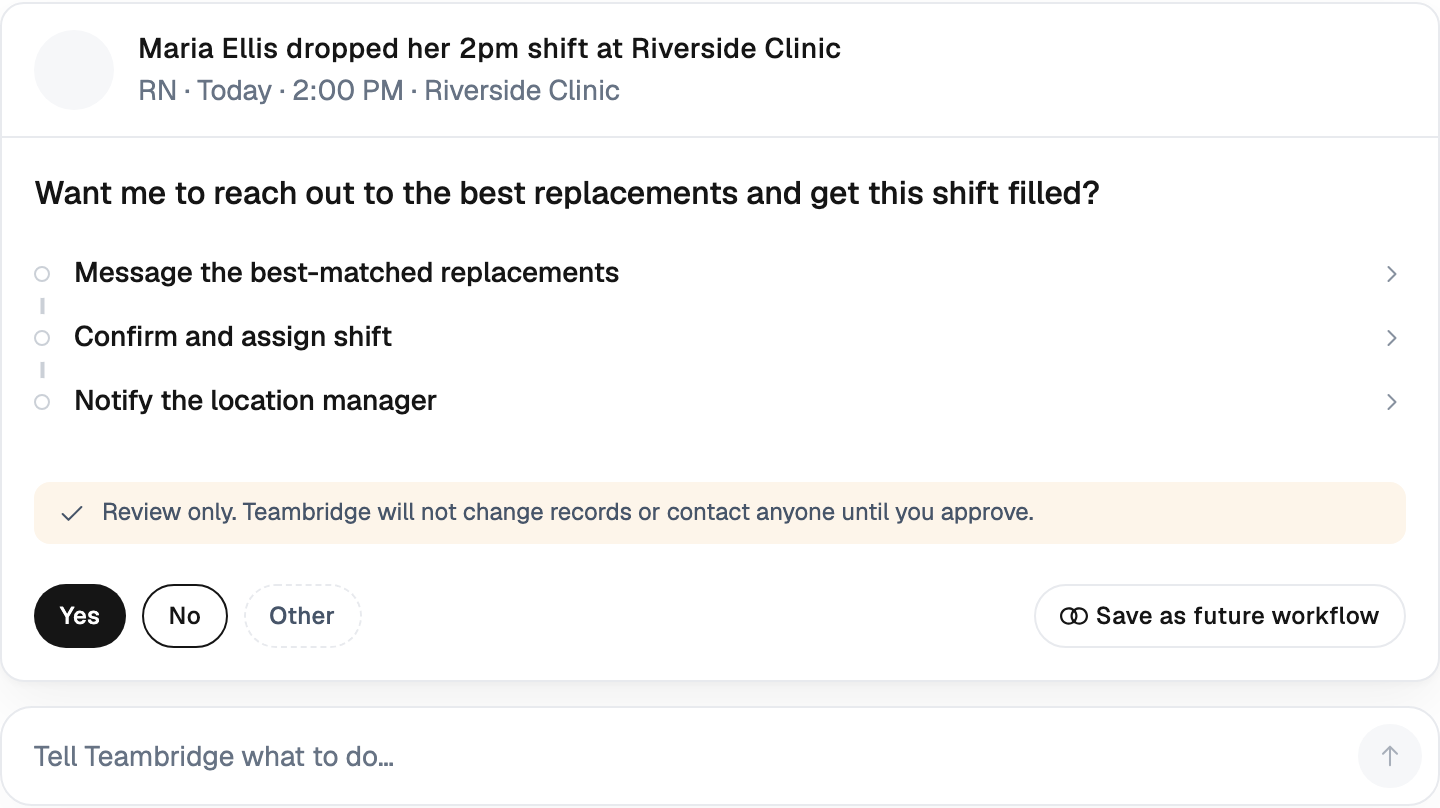
In staffing, time-to-fill is not requisition-to-hire. It's request-to-confirmed-worker for a specific shift, often with a window measured in hours. A client calls Tuesday at 4pm needing six forklift operators for Wednesday's 6am shift. The clock starts immediately.
The usual bottlenecks are mechanical:
- Coordinator manually pulls a list of qualified, available workers from a spreadsheet or ATS.
- They broadcast via text, then sit on replies — often re-pinging non-responders.
- As workers reply yes, the coordinator re-checks credentials are current.
- They confirm availability one-by-one, then assign and notify the client.
Every step is human-gated. Every step is also a place where an unqualified or unavailable worker can slip through, costing the agency the placement and possibly the client.
The operational levers that actually move the number:
- Auto-fill against a curated pool. Open shift goes out only to workers who match the credential, geography, and rate-band requirements.
- Credential-aware matching. If a worker's BLS expires Friday, they don't see the Saturday shift. No coordinator intervention required.
- Predictive no-show flagging. Workers with recent no-show patterns get flagged before assignment, not after.
- In-app confirmation with SMS fallback. Replies aggregate in one queue instead of a coordinator's text thread.
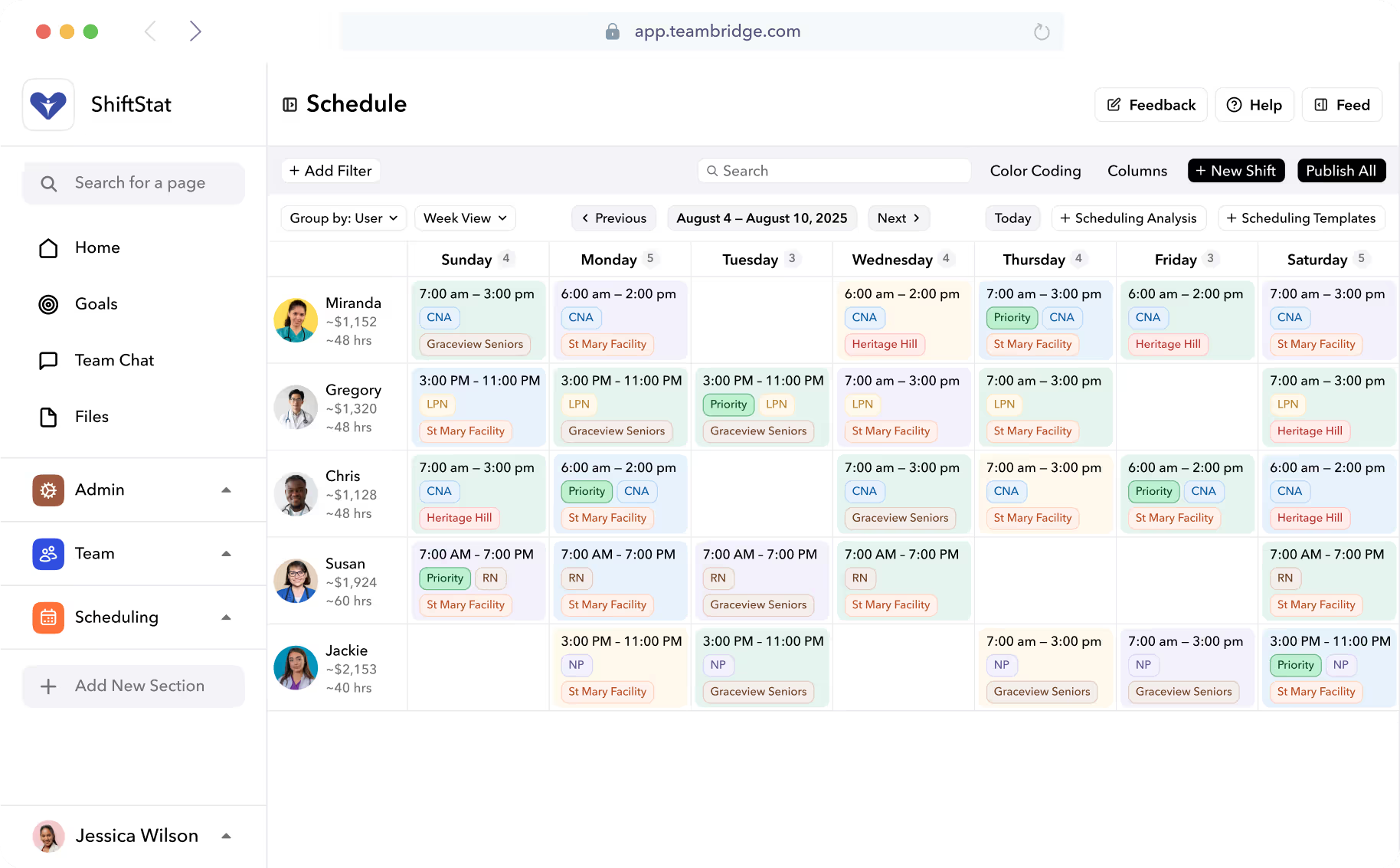
For a deeper look at how this works in practice, Teambridge's scheduling product covers the credential and auto-fill logic specifically. The headline benefit isn't just speed — it's that the coordinator's job shifts from "who do I text next" to "which exceptions need a human."
The Staffing App Is the Product Your Workers Actually Use
Back-office software is invisible to the worker. The mobile app isn't. If a worker can't pick up a shift, message a coordinator, upload a credential, and see their pay from their phone, every other improvement in the stack lands flat.
Treat the mobile app as the real product. The feature set is now table stakes, not differentiation:
- Open shift marketplace with one-tap pickup
- Shift swap and giveback (with rules enforcement)
- Availability and time-off submission
- Document and credential upload from camera
- 1:1 messaging with coordinators
- Broadcast messages with read receipts
- SMS fallback for workers who don't open the app
That last point matters more than vendors usually admit. A meaningful share of any temp pool will not install an app, will not enable push notifications, or will simply ignore them. If your communication layer doesn't fall back to SMS automatically, you've built a system that works for the workers who don't need it and fails for the ones who do. Teambridge's mobile app and communication module are designed around that fallback behavior specifically.
Tip
When you evaluate a worker app, send it to ten of your actual workers — not your office team — and watch what they do in the first five minutes. If they can't find the open shifts tab without help, the product is wrong, not the workers.
Credentials, Pay Rates, and Compliance Across Many Clients
This is where generic WFM tools quietly fail. Each placement has its own credential matrix: badges, BLS, OSHA 10, food handler card, drug screen recency, client-specific orientation. Each placement also has its own bill rate, pay rate, overtime rule, and often a different state jurisdiction with its own meal break and rest period law.
A worker who is fully qualified at Client A may be unqualified at Client B because Client B requires a current TB test. A spreadsheet won't catch that on a Tuesday afternoon when you're trying to fill six shifts in two hours.
The compliance landscape isn't simplifying, either. State-by-state predictive scheduling laws, EVV requirements in home care, sector-specific safety training — the matrix keeps growing. Modern platforms handle this with a credential engine that gates assignments in real time and stores audit-ready documentation behind every shift.
A credential-aware scheduling layer prevents the call no agency wants to make: "we sent an unqualified worker." It also prevents the back-pay claims that follow when overtime rules get applied incorrectly across multi-client weeks. Teambridge's automations handle credential renewals, expiry reminders, and re-verification workflows without a coordinator having to track them manually.
What the compliance layer needs to do
| Requirement | Generic WFM | Purpose-built for staffing |
|---|---|---|
| Per-client credential matrix | One global list | Distinct matrix per client and per role |
| Pay/bill split | Single pay rule | Configurable per placement |
| Overtime across clients | One employer logic | Weekly hours aggregated across all clients |
| Audit trail | Time records only | Shift, credential, message, edit history |
| Jurisdiction handling | Primary state | Worksite state, per shift |
Client Satisfaction Is a Data Problem, Not a Service Problem
Agencies that win renewals are not the ones with the friendliest account manager. They're the ones who can show the client a dashboard on Monday morning that answers: fill rate last week, time-to-fill on urgent requests, no-show rate, credential compliance, hours billed vs. budgeted, overtime exposure.
Clients don't churn because they don't like you. They churn because they don't trust the numbers, or because a competitor showed them better numbers. The agencies that treat client-facing reporting as a product feature — not a quarterly business review slide — keep more accounts.
A client portal that updates in real time changes the conversation from "can you explain last month" to "here's how next week looks."
The broader WFM market has been moving in this direction for several years. Research firm Nucleus Research determined that workforce management delivers $12.24 for every dollar spent, with an average payback period of just under five months — and most of that ROI comes from operational visibility, not just labor cost cuts. Tech-enabled, specialized agencies are absorbing share from generalist competitors precisely because they can prove what they're delivering.
What to Look For in Staffing Agency Software (Buyer's Checklist)
This is the part where most buyers get burned. An HR-built WFM tool with "multi-location support" is not the same as a staffing-built platform with multi-client architecture. Demos look similar. Implementations don't.
Use this checklist when evaluating:
- Multi-client architecture, not multi-location. Separate credential matrices, pay/bill rules, contacts, and reporting per client.
- Native credential engine. Expiry tracking, gated assignment, renewal automation, document storage.
- Mobile worker app with SMS fallback. If app adoption is below 100%, SMS must cover the gap automatically.
- Automated shift broadcast and auto-fill. With rules for tiers, opt-ins, and override.
- Per-client pay and bill configuration. Including burden, spread, OT premiums, and shift differentials.
- Time tracking with geofence and offline capture. Workers on industrial sites lose signal. Timecards still need to be accurate.
- Exception handling for timecards. Missed punches, edits, and approvals routed cleanly, not via email.
- Integrations with payroll, ATS, and AR. A platform that exports cleanly to QuickBooks, NetSuite, and major payroll providers.
- Audit-ready compliance reporting. One click to produce a defensible record per worker, per shift, per client.
- Client portal or scheduled reporting. Visibility you can hand to the client without a coordinator assembling it manually.
Warning
The single most common trap: buying an HR-built or retail-built WFM tool because it demos well, then spending the next year asking for staffing-specific features that the underlying data model can't support. Architecture decisions made in year one of the product are not workaround-able later.
If you want the full feature breakdown by industry, the Teambridge platform overview and the staffing industry page cover the architecture and the workflows side by side.
The Math: What Purpose-Built WFM Changes in 90 Days
The gains from moving off stitched tools are operational, not magical. The pattern shows up consistently across agencies that switch:
- Time-to-fill drops. Auto-fill against curated, credential-cleared pools removes most of the manual broadcast loop.
- Credential incidents drop to near zero. Gating at the assignment step prevents the issue at the source.
- Coordinator load per 100 workers drops. One coordinator can manage a larger pool because the platform handles the routing work.
- Timecard disputes drop. Geofenced clock-in and exception routing remove the "he said, she said" loop.
- Pay cycles tighten. Cleaner timecards mean fewer corrections, which means faster close.
Directionally, the WFM industry has produced consistent ROI signals. On average, organizations see a return of $12.24 for every dollar spent on workforce management software, with a payback period of less than 5 months, according to Nucleus Research data summarized by UKG. Staffing-specific deployments tend to land in that range or better because the baseline (spreadsheets + group texts + ATS) is so much weaker than the enterprise baseline the research was drawn from.
A few things to keep honest about: the gains assume you actually migrate the work into the system. Buying a platform and continuing to run the old process in parallel produces no ROI. The agencies that capture the full benefit are the ones that retire the spreadsheet on day one, not month six.
Where to Start
If you're trying to figure out whether your current stack is the bottleneck, audit it against three questions:
- How long does it take to confirm a filled shift today, from client request to worker confirmed? Measure it on five recent fills, not the best one.
- How many credential exceptions slipped through last month? Count the cases where a worker arrived underqualified, or a renewal lapsed mid-assignment.
- What does your client see between Monday and Friday? If the answer is "an email when there's a problem," your retention is exposed.
If any of those answers are uncomfortable, the stack is the bottleneck, not the team. The agencies pulling ahead right now aren't doing it through hustle. They're doing it through architecture — a platform that handles routing, compliance, and client visibility so coordinators can focus on the exceptions.
The next steps: review Teambridge's staffing industry page for the architecture details, or read the customer stories from agencies that have already made the switch. Either way, start with the audit. The numbers will tell you what to do next.

About the author

Content Writer at Teambridge
Anis Nanai is a content writer at Teambridge, with a focus on workforce management and the realities of running hourly teams. He prioritizes conversations with customers, staying close to the market, and understanding how workforce needs are changing. His writing connects those concerns to practical decisions about scheduling, time tracking, staffing, and automation. He examines product developments through the questions that matter to operators: what does this solve, how would it work for my team, and what evidence supports it?
Company perspective: this author works at Teambridge. Customer outcomes are attributed to their published sources.
View LinkedIn profile