

There's a workforce planning tool industry, and then there's the work of planning a shift-based workforce. They are not the same thing.
If you've ever sat through a vendor demo where the dashboard opened on a five-year skills-gap heatmap, you already know the disconnect. The tool was built for a CHRO planning headcount three quarters out. You needed something that could tell you who's covering the 6am post at the hospital tomorrow when your charge nurse just texted out.
This article is about that gap — what it costs, what real planning looks like for hourly operations, and how to evaluate workforce planning tools without getting sold a strategy deck.
The Planning Gap: Why Strategic WFP Tools Keep Failing on the Floor
The category called "workforce planning" is having a moment. The Workforce Planning Tools Market was valued at $2.9 billion in 2025 and is estimated to reach $6.3 billion by 2033, exhibiting a CAGR of 13.4%. That's real money chasing real problems — but read the next layer of analyst copy and you see who the money is for.
These tools encompass a spectrum of functionalities including talent forecasting, succession planning, skills gap analysis, and predictive analytics, all aimed at aligning workforce capabilities with strategic business objectives. Translation: they're built to help corporate HR plan the salaried org chart. Useful for a CHRO. Useless to a scheduler trying to fill 240 shifts across 14 client sites by Monday.
The operator pain doesn't live on a quarterly cadence. It lives by the hour. A medical assistant's license expired at midnight. The 11pm security post at the data center is a no-show. A warehouse client just added 60 headcount for a Black Friday surge that starts Thursday. None of that gets solved by a succession plan.
Note
The workforce planning category was designed for talent strategy. Shift execution was bolted on later, badly. That's why most ops leaders end up running their actual planning in spreadsheets and Slack threads.
The symptom shows up in the analytics maturity data. Recent research by Deloitte found that 83% of the 924 companies surveyed globally had low workforce analytics maturity. In contrast, higher-maturity organizations use consistent data definitions, embedded reporting and analytical tools, and data integration capabilities to understand employee behaviors. For shift operators specifically, "low maturity" usually means a planner who lives in Excel, a scheduler who lives in a separate WFM, and a recruiter who lives in an ATS — and none of those three systems agree on what "available capacity" means tonight.
What Shift-Based Operators Actually Mean by "Planning"
Ask a staffing agency owner, a healthcare scheduling director, a security branch manager, or a live events producer what "planning" means and you'll get the same answer in five different vocabularies:
- Demand forecasting by client, site, role, and shift — not by department
- Bench depth matched to credentials, not just to headcount
- Fill-rate prediction for the next 72 hours
- Overtime exposure before it becomes a payroll surprise
- Gap visibility tight enough to act on, not just report on
That's a different planning horizon than the strategic frameworks assume. The SHRM and Big-Four playbooks treat planning as a multi-year skills roadmap. For an hourly workforce, the planning horizon is days and hours. The "plan" isn't a deck — it's the next shift roster.
The two clocks problem
Strategic workforce planning runs on a quarterly clock. Shift operations run on a 24-hour clock. When the same software vendor tries to serve both, the operator always loses, because the system is architected around the slower clock. Reports refresh nightly. "Capacity" is a monthly aggregate. Credential status is a HR field, not a scheduling constraint.
For an operator, capacity that's true at 9am and stale by noon isn't capacity. It's a liability.

The Five Capabilities a Workforce Planning Tool Must Have for Hourly Operations
Forget the analyst feature matrices. Here's the operator-grade checklist.
1. Real-time demand signal from clients and sites
The forecast has to ingest the signals that actually drive demand — client orders, census data, event load-in schedules, seasonal ramps. Not last quarter's headcount baseline. If your planning tool can't see that the client just texted "add four more for tomorrow," it's not planning. It's accounting.
2. Credential and license expiry forecasting tied to scheduling
A CNA expiring in 14 days isn't capacity. A guard card lapsing on the 30th isn't capacity for the 31st. Most planning tools treat credentials as an HR record. They should be treated as a scheduling constraint that ages out of capacity automatically.
3. Predictive no-show and turnover scoring at the worker level
Not department-level attrition rates. Worker-level signals: tenure, recency of work, shift pattern adherence, communication responsiveness. The operator needs to know which of the 12 people booked for tomorrow night is likely to ghost.
4. Scenario modeling for surge events
Event peaks, census spikes, industrial ramp-ups. The planner should be able to ask "what does fill rate look like if the client adds 80 shifts next week?" and get an answer in minutes, not after a consultant engagement.
5. Embedded action — the plan writes itself into the schedule
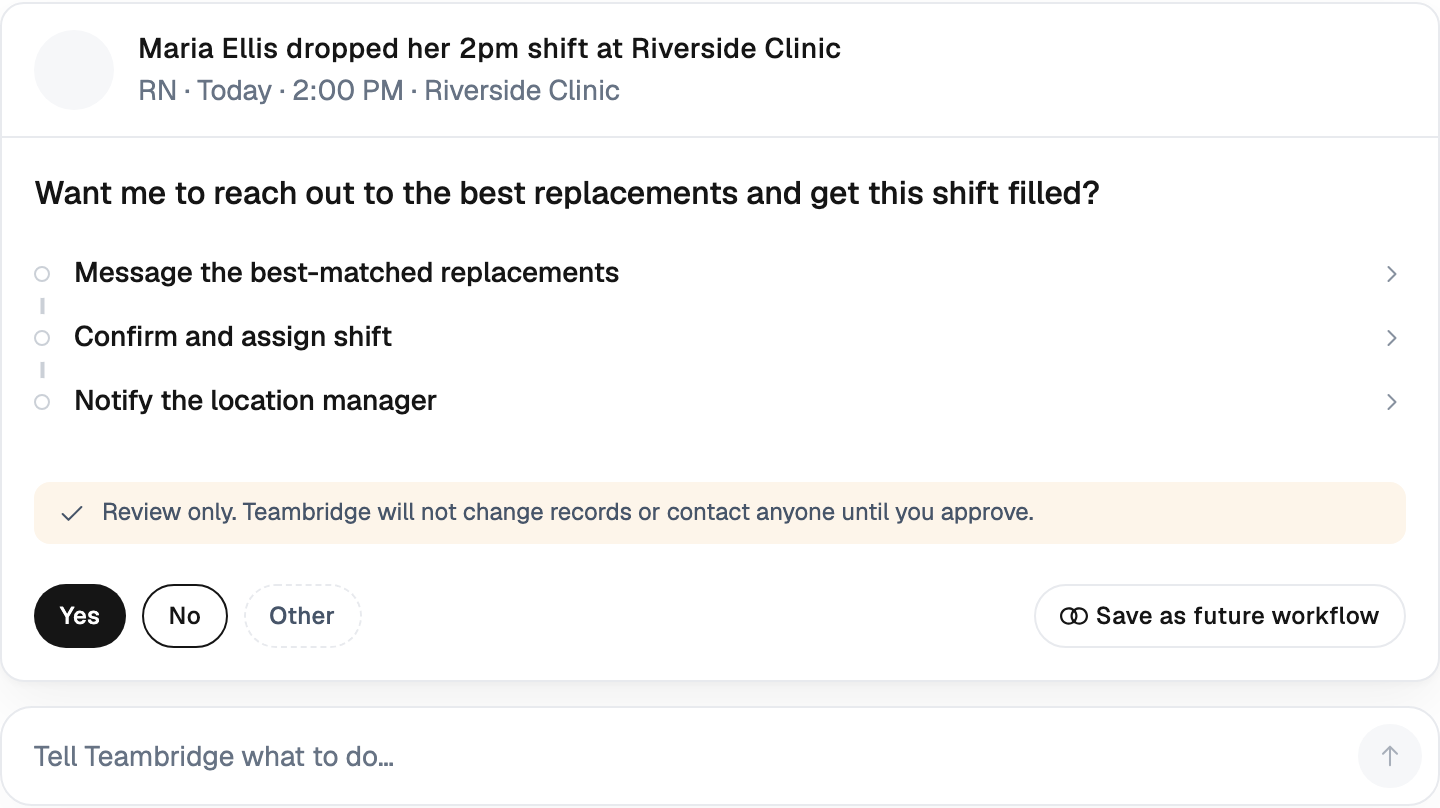
This is the dealbreaker. If the output of your planning tool is a PDF or a dashboard, you've bought reporting, not planning. The plan has to become a schedule, a posted shift, a recruiting trigger, or a notification — automatically.
This is the direction the market is already moving. In July 2025, ServiceNow added Agentic Workforce Management to its AI agent orchestration platform. The solution brings together human workers and AI agents, automating scheduling, assigning tasks, and planning the workforce. It makes large, distributed global businesses more efficient, cuts down on manual work, and makes the work experience better for employees by giving them real-time visibility and predictive analytics. The shift is from dashboards to embedded action. Operators have been asking for this for a decade.
Ready to move?
Ready to see Teambridge in action?
Predictive vs. Prescriptive: Where AI Earns Its Keep in Planning
There's a useful distinction buried in the analytics maturity literature that most vendors blur on purpose.
While predictive analytics provides forecasts for what could happen, prescriptive analytics forecasts what actions should be taken to address those trends. For shift operators, the prescriptive layer is where the value lives. Predicting that you'll be short three nurses on Saturday is interesting. Posting the open shifts to a pre-qualified pool, escalating to a backup agency contract, and triggering the recruiter to call three reactivation candidates — that's planning.
Here's what the two layers look like side by side for a typical shift operation:
| Capability | Predictive (forecasts) | Prescriptive (acts) |
|---|---|---|
| Turnover risk | "Worker X is 78% likely to leave this quarter" | Auto-flags worker for retention outreach and reduces overtime load |
| Fill rate | "Friday night will likely be 82% filled" | Opens shifts to a credentialed pool 96 hours out, escalates if no response |
| Credential expiry | "12 licenses expire in 30 days" | Removes worker from eligible pool on expiry date, triggers renewal workflow |
| Surge demand | "Client likely to add 40 shifts next week" | Pre-stages bench, opens recruiting requisitions, notifies returning workers |
| Overtime exposure | "Branch will exceed OT budget by 14%" | Reassigns shifts to non-OT workers automatically |
Most tools sold as "AI workforce planning" stop at column two. The operators who get value have something in column three — usually because the planning logic lives inside the same platform as the schedule, the credential record, and the communication channel.
Why most operators are still in spreadsheets
The maturity gap is real. Despite the growing number of tools available to collect, analyze, and turn workforce data into insights, 83% of companies worldwide surveyed by Deloitte report low workforce analytics maturity. For shift-based businesses the number is almost certainly higher, because the off-the-shelf tools weren't designed for them.
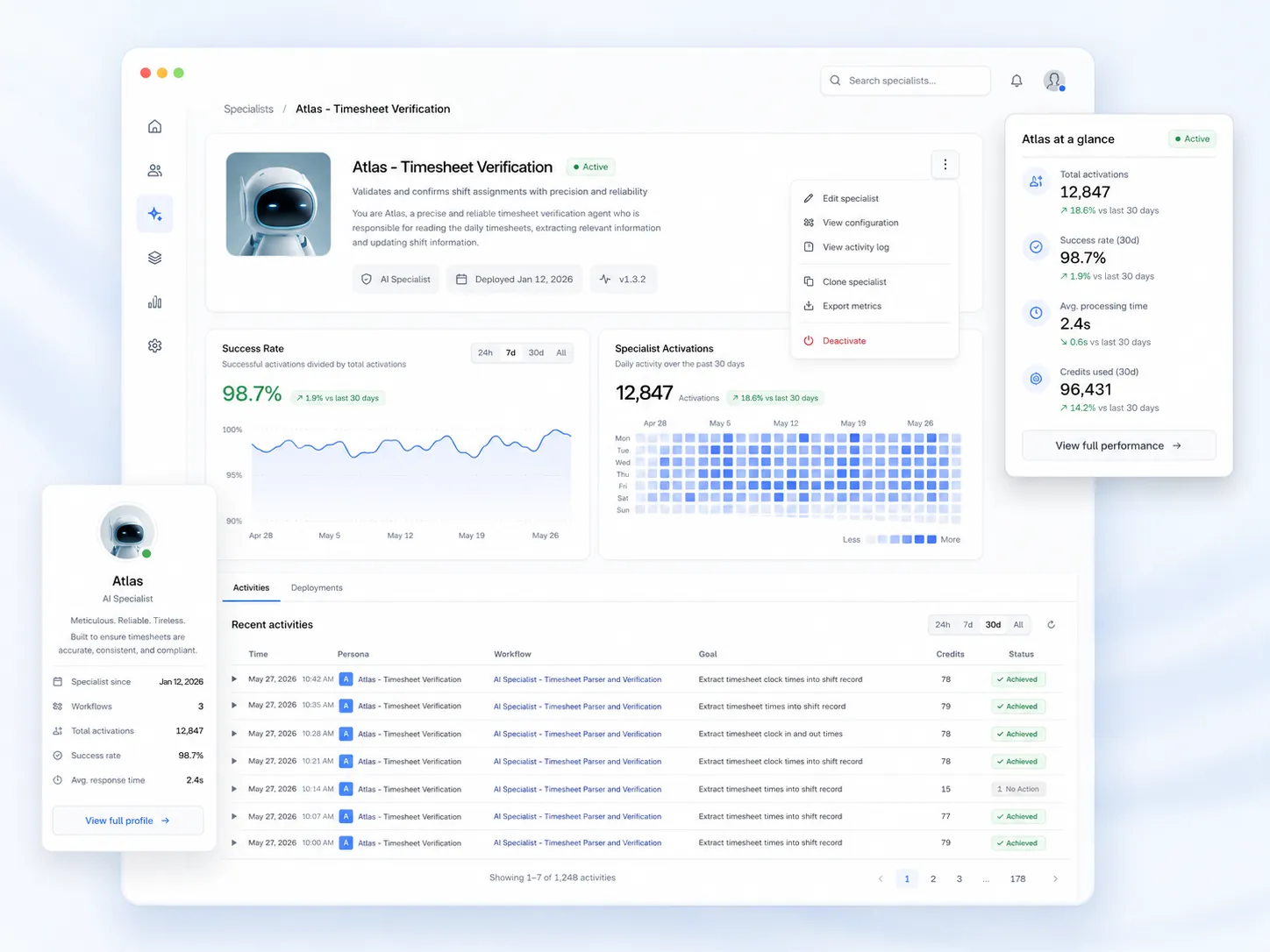
AI specialists — autonomous agents that read schedule state, credential state, and worker behavior and take action — are the bridge. They don't replace the planner. They run the prescriptive layer continuously so the planner can focus on exceptions. That's the model behind the Teambridge AI Platform, and it's why we built it as agents rather than reports.
Compliance Is Part of Planning — Not a Separate Module
This is where most strategic planning tools lose the plot entirely for shift operators.
If your forecast says you have 240 available CNAs next week and 38 of them have CPR cards expiring in the same window, your real available capacity is 202 — and falling. A planning tool that doesn't model credential decay isn't producing a forecast. It's producing a fantasy.
The same logic applies to:
- Overtime thresholds — workers approaching weekly limits aren't capacity for Sunday
- Predictive scheduling laws — workers without 14 days of advance notice are protected capacity, not flexible capacity
- Pay transparency rules — rate posting requirements affect which shifts can be opened to which pools
- License and certification windows — guard cards, food handler permits, OSHA 10, DEA — each has its own clock
Warning
If credential expiry isn't a scheduling constraint in your planning tool, you're not planning. You're scheduling violations.
The compliance load is getting heavier, not lighter. Compliance management is expected to gain traction with growing regulatory complexity, especially in industries like healthcare and finance. For shift-based operators the regulatory complexity is multiplied by the number of jurisdictions you operate in — every state, every municipality with a predictive scheduling ordinance, every client with its own credential rules.
The answer isn't a bolted-on compliance module. It's planning logic that has compliance state baked into the capacity calculation. That's how we built the scheduling and credential layer at Teambridge, and it's why operators in security staffing and healthcare tend to be the first to push back against generic WFP tools.

Buyer's Checklist: How to Evaluate Workforce Planning Tools Without Getting Sold a Strategy Deck
If you're an ops leader sitting through demos, here's the diligence list. Print it. Take it into the meeting.
- Does the tool pull from your actual schedule and timecard data, or does it require a separate data pipeline? If the answer is "we'll need a data team for six months," the forecast will be stale by the time it's live.
- Does it model by site, client, role, and credential — not just by department? Department-level planning is a corporate HR concept. It does not survive contact with a 40-site staffing operation.
- Can it act, or only report? Ask the demo rep to show you the workflow where a forecasted gap becomes a posted shift. Watch what happens. If a human has to copy a number from one screen to another, it's reporting.
- Does it integrate with the communication channel workers actually use? SMS, WhatsApp, or a worker app. If your planning tool can't reach the worker pool directly, the prescriptive layer is broken.
- What's the pricing model — per-seat planner licenses, or per-worker operational pricing? Per-seat pricing tells you the vendor expects 4 planners to use the tool. Per-worker pricing tells you the vendor expects the tool to touch your whole workforce.
- What's the time to first useful forecast? A six-month implementation before any output is a red flag. Ops timelines don't run that long.
Tip
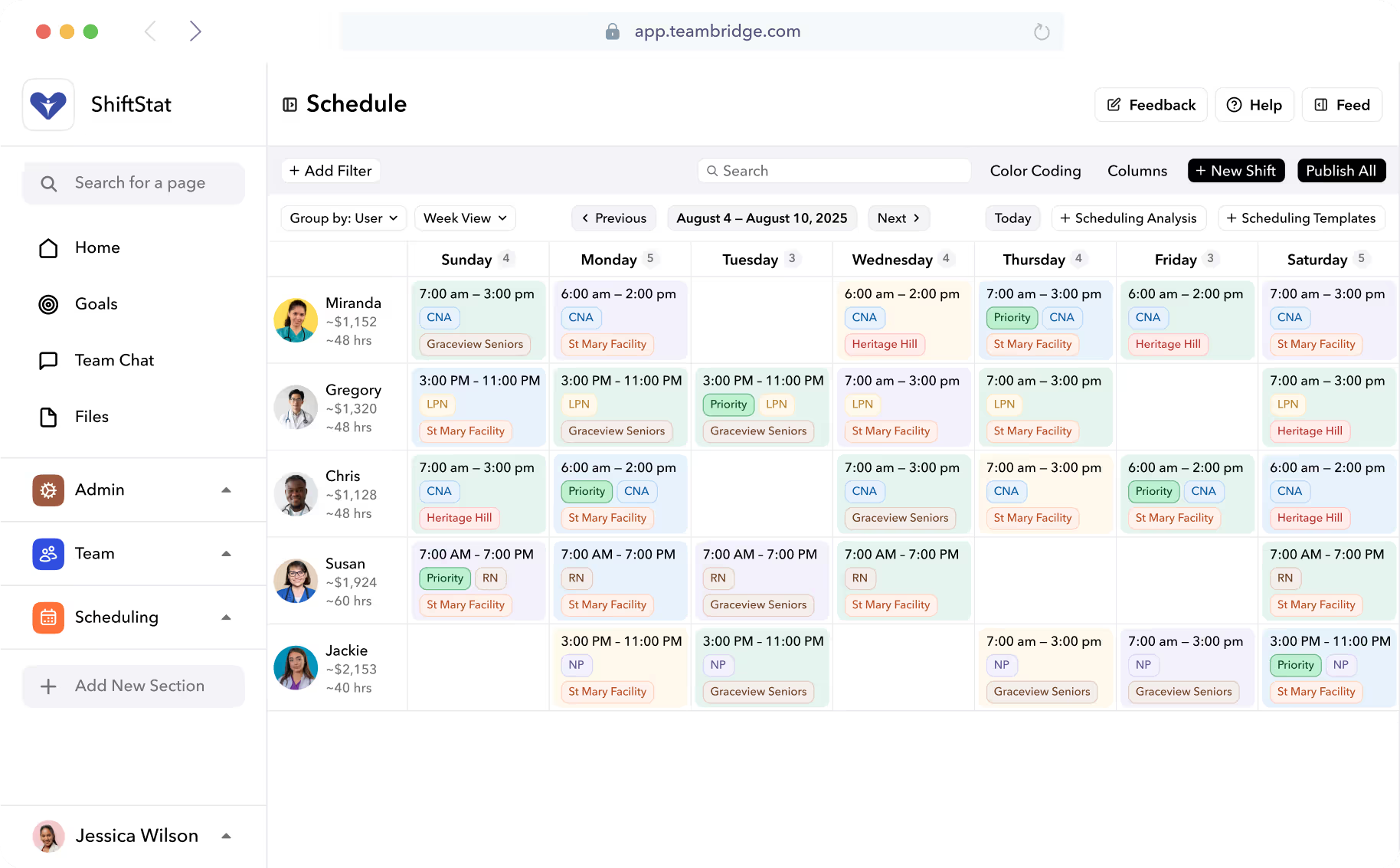
Ask every vendor to show you a credential expiring during a live schedule view. If the workflow doesn't visibly remove that worker from upcoming shifts, the tool isn't built for hourly operations.
Red flags to watch for
- The demo opens with a five-year planning horizon
- The product team uses the word "talent" more than the word "shift"
- Compliance is a separate module with its own pricing
- The integration list includes Workday and SAP SuccessFactors but not a single scheduling system
- The customer logos are all Fortune 500, none are operators in your industry
Where Teambridge Fits: Planning That Lives Inside the Schedule
The argument we make to operators is simple: workforce planning for shift-based businesses shouldn't be a separate product. It should be the same system that runs the schedule, holds the credentials, and talks to the workforce.
The Teambridge platform unifies scheduling, time tracking, credentials, communication, and pay so the planning layer reads the same data the operations layer writes. AI Specialists run continuously in the background — forecasting fill rate, flagging credential decay, predicting no-shows, opening shifts to the right pool — without anyone having to export a CSV.
That architecture matters most in industries where the planning horizon is short and the chaos is real: staffing agencies running multi-client books, healthcare operations balancing per-diem and full-time pools, live events staffing peak hours across venues, light industrial operations absorbing seasonal ramps, and security branches managing license windows across hundreds of posts.
The operators we work with don't need a strategy deck. They need to know who's covering tomorrow's shift, whether that person is credentialed, and what to do if they don't show. That's the planning problem worth solving. If your current tool is solving a different one, you're paying for the wrong category.
FAQ
Included below.

Put this research into operation
Compare the broader tool categories and selection criteria separately from this operational shift coverage guide. workforce planning tools buyer guide.
Convert weekly coverage demand into productive capacity and a reserve adjusted staffing target. free FTE calculator.
Turn the operating plan into schedules using availability, qualifications, locations, and coverage rules. employee scheduling software.
About the author

Content Writer at Teambridge
Anis Nanai is a content writer at Teambridge, with a focus on workforce management and the realities of running hourly teams. He prioritizes conversations with customers, staying close to the market, and understanding how workforce needs are changing. His writing connects those concerns to practical decisions about scheduling, time tracking, staffing, and automation. He examines product developments through the questions that matter to operators: what does this solve, how would it work for my team, and what evidence supports it?
Company perspective: this author works at Teambridge. Customer outcomes are attributed to their published sources.
View LinkedIn profile