

Reviewed August 2026
2026 buyer update: start with the field operating model
Field service software is not one category. Some teams need routing, quotes, work orders, and asset history. Others need to place qualified people into shifts, communicate changes, capture time, and resolve exceptions. Define that operating model before comparing products.
Coverage and scheduling
Can managers match demand with availability, roles, qualifications, locations, and overtime rules?
Worker readiness
Can the workflow prevent an assignment when credentials, documents, training, or onboarding steps are incomplete?
Mobile execution
Can workers receive shifts, confirm actions, submit information, and contact the right manager from the field?
Time and exceptions
Can managers review attendance, missed punches, approvals, and field exceptions before downstream payroll?
Configuration
Can operations change forms, rules, permissions, and workflows without rebuilding the system?
Implementation evidence
Ask vendors to map one real workflow from demand through assignment, completion, exception handling, and reporting.
Product boundary
Teambridge is designed for shift based workforce operations. It is not a route optimization engine, field service CRM, quoting tool, work order system, or asset maintenance database. Teams that need those systems should evaluate how the workforce layer integrates with them.
Managing a distributed workforce isn’t easy. Between fluctuating staff levels, compliance requirements, and keeping credentials up to date, back-office teams have plenty to juggle. When you add in the rising expectations of mobile technicians to deliver fast, high-quality service, the need for intelligent tools becomes clear.
That’s where field service management software comes in. These platforms help staffing companies sync their back-office operations with technicians in the field, streamlining scheduling, credential tracking, and communication, so everyone’s on the same page.
6 best field service management software for 2025 onward
Field service teams must juggle dispatching, work order updates, inventory, and customer communication while technicians are on the move. Modern field service management (FSM) software streamlines complex workflows with real‑time data and automation. This ensures that technicians arrive prepared and back-office teams stay aligned.
Below is a shortlist of the top tools available for 2025 and beyond, along with key features, benefits, pricing, and limitations.
1. Teambridge
Teambridge acts as an integrative layer between back-office systems (ERP, CRM, payroll, etc.) and mobile technicians. Rather than replacing existing modules, it synchronizes work orders, asset histories, and customer data in real time and automates alerts, status updates, and digital checklists. Its composable architecture allows organizations to build customized workflows without a single line of code.
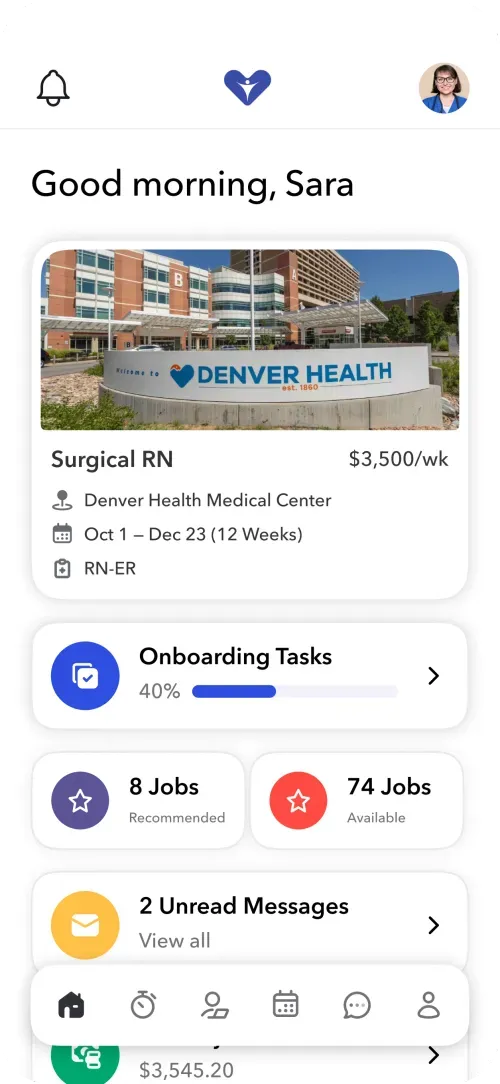
Teambridge mobile app dashboard for Sara, a surgical RN, shows current work and 40% progress on onboarding tasks (Source)
Key features:
- Customizable back‑office command center: Add custom data fields to create a single source of truth and control employee permissions by role. Also, consult real‑time shift notifications to help avoid understaffing.
- No‑code automation builder: Automate everything from routine notifications to complex multi‑step processes, streamlining recruiting and onboarding while offering incentives to employees. Teambridge customer Revv Staffing reduced its admin work time by 60% with automated workflows.
- Branded mobile app: Personalize your staff’s experience while they apply, onboard, clock in, and communicate in a central, white‑label mobile app.
- Advanced scheduling engine: Handle complex rules, automatically find shift replacements, and boost first‑time fix rates with AI‑driven scheduling.
Limitations:
- Limited payroll integrations
- Composable, out-of-the-box solution that requires implementation to get up and running for field asset management
Pricing: Teambridge tailors its pricing to each client’s needs and can provide details on request.
2. ServiceMax
ServiceMax is an asset‑centric FSM suite that excels in scheduling, dispatch, and field technician management. It supports comprehensive work-order creation, asset lifecycle tracking, and advanced inventory control. It also integrates seamlessly with Salesforce for CRM alignment.
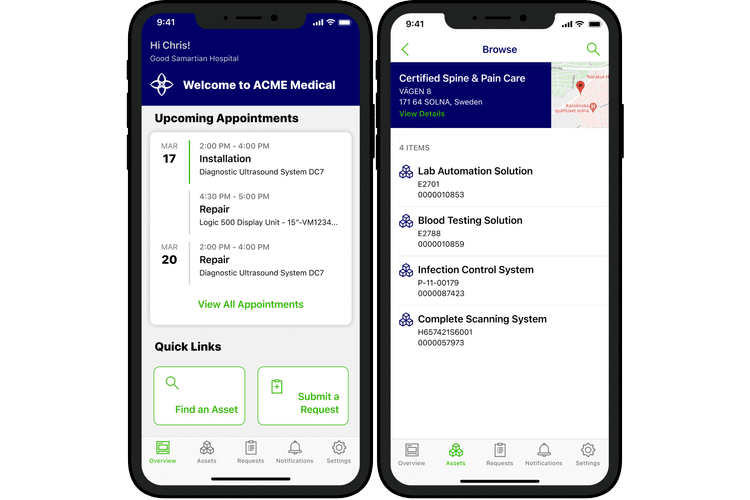
Two mobile interfaces showing a field employee’s task schedule with ServiceMax (Source: WorkYard)
Key features:
- Intelligent scheduling and dispatch: Match technicians to jobs based on their skills, availability, and location.
- Extensive work order and inventory management: Manage work orders from creation to billing, track asset histories and warranty details, and automate parts reordering.
- Mobile accessibility and offline mode: Provide technicians with on‑site access to schedules, job updates, and customer signatures via the mobile app.
- Analytics and AI tools: Produce service‑report summaries and forecast maintenance needs for technicians with AI solutions.
Limitations:
- A steep learning curve due to its extensive feature set, according to Research.com
- Interface clutter and slow performance with large data volumes
- Limited mobile app offline functionality
Pricing: ServiceMax pricing isn’t available on its website.
3. Salesforce Field Service
Built on the Salesforce platform, Salesforce Field Service software extends the CRM to provide an FSM solution. It merges scheduling, dispatch, inventory, and customer communication tools with Salesforce’s CRM data.
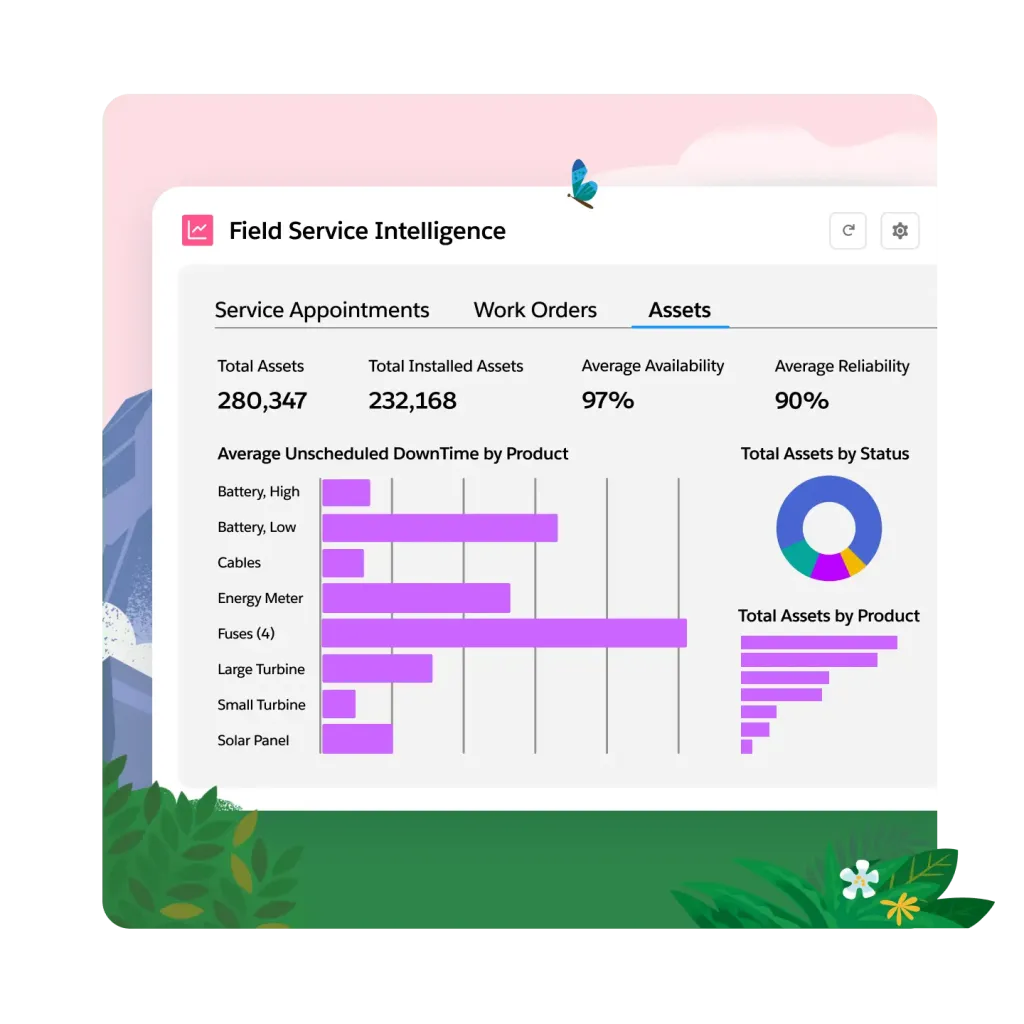
Field Service Intelligence dashboard shows charts and metrics on total assets, reliability, and downtime (Source: Salesforce)
Key features:
- Unified scheduling and dispatch console: Manage technicians from a single calendar and dispatch console with real‑time insights into availability, location, and expertise.
- Mobile app offline capability: Let technicians access job details, capture signatures, and work offline with automatic synchronization.
- CRM and AI integration: Connect seamlessly to Salesforce CRM so you have up-to-date customer data.
- Customizable workflows and compliance: Customize forms and checklists, building safety protocols directly into your workflows.
Limitations:
- Extensive customization options requiring significant time and expertise to implement, according to reviewers
- Pricing higher than some competitors, making it a substantial investment
- Difficulty integrating non‑Salesforce or legacy systems, which may require custom development
Pricing: Salesforce Field Service business pricing starts at $55 per user/month for their Contractor plan or $175 per user/month for their Dispatcher and Technician plans.
4. NetSuite Field Service
NetSuite’s Field Service module (formerly NextService) is built into the Oracle NetSuite ERP, connecting service operations with financials, CRM, and inventory. It works for organizations that want to run field service, accounting, and logistics on a single platform.
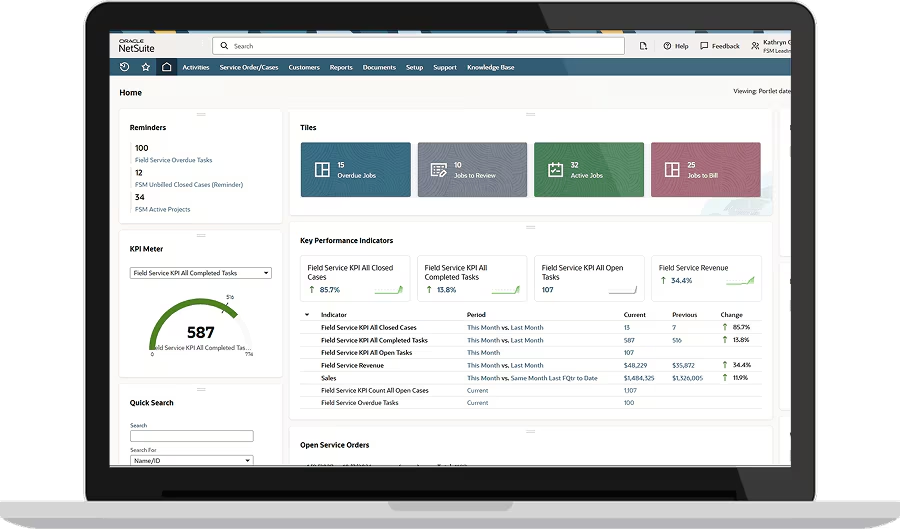
NetSuite dashboard on a laptop screen displaying field service key performance indicators like completed and open tasks (Source: NetSuite)
Key features:
- Integrated scheduling and dispatch: Match technicians to jobs based on skills, location, parts availability, and priority.
- Mobile access and offline support: Give your technicians the ability to view schedules, access customer history, record hours, collect signatures, and process payments via a mobile app that also works offline.
- Inventory and asset management: Track parts and assets across multiple locations, including service vehicles, with serial number and warranty tracking.
- Customer portal: Invite clients to schedule appointments, check statuses, and pay invoices through a portal.
Limitations:
- Prohibitive costs, including subscription fees, implementation, and customization, for small to medium‑sized businesses, according to ERP Peers
- Lengthy implementation, often taking months and requiring external consultants
- Steep learning curve and limited offline capability due to the system’s breadth
Pricing: NetSuite pricing isn’t available online. You need to schedule a call to get a quote.
5. Praxedo
Praxedo is a cloud-based field service management platform designed to streamline work orders, scheduling, and mobile access. It provides an app for technicians and integrates with common back-office systems. It’s relatively easy to set up and adapt to different business needs.
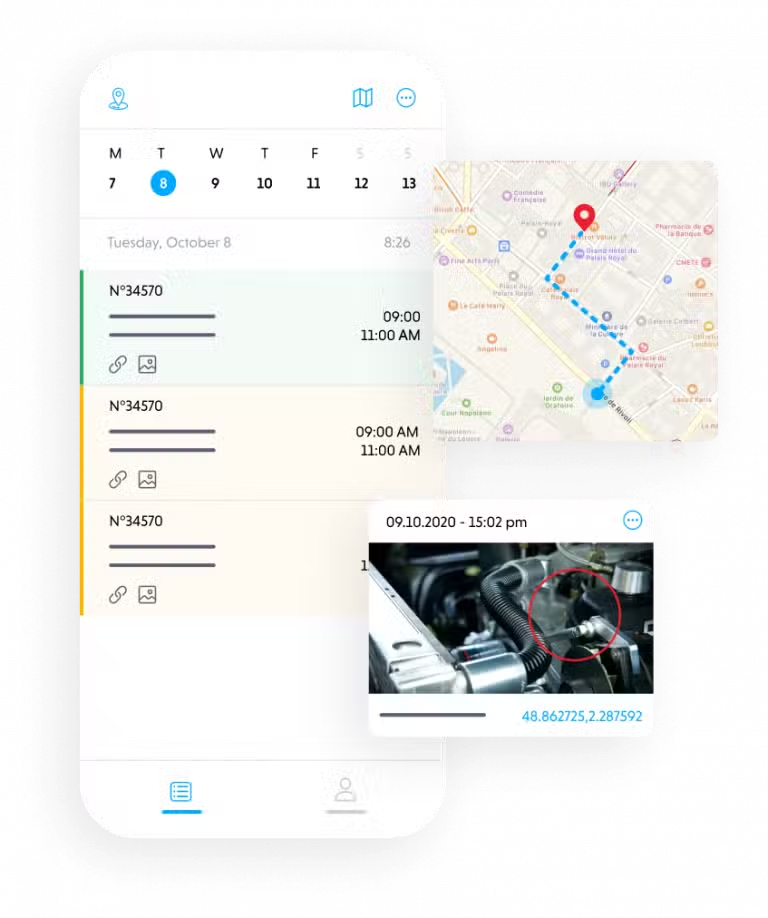
Mobile app screenshot shows a daily schedule next to a map and an image of a mechanical issue (Source: Praxedo)
Key features:
- Customizable web and mobile interface: Configure forms, fields, and workflows directly in the platform to match on-site processes.
- Automated scheduling: Leverage built-in mapping, geofencing, and time window constraints to assign jobs and optimize technician routes.
- Offline-capable digital work orders: Download work orders, capture signatures and photos in the field, then autosync updates and reports once back online.
- Modular scalability: Add users, teams, or contractor pools on demand, with role-based access and multi-tenant support for large or distributed operations.
Limitations:
- Time‑consuming exports and template creation, according to some users
- Occasional system instability and slow customer feedback
- Lacking certain features, such as recurring billing and advanced statistics
- Overwhelming initial configuration options
Pricing: Praxedo’s Basic plan starts at $39/month, with automated AI plans starting at $149/month.
6. ServicePower
ServicePower is a veteran FSM suite known for automation, real‑time visibility, and customer self‑service. It’s popular with telecommunications, utilities, and home service businesses.
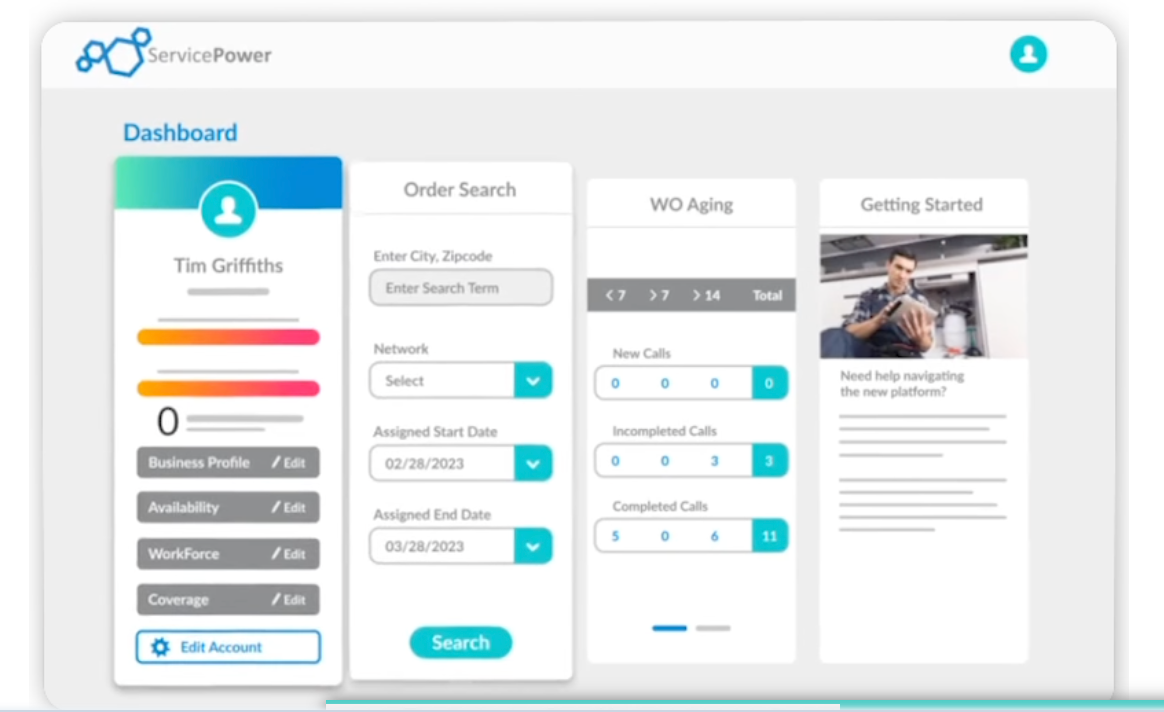
ServicePower dashboard for Tim Griffiths shows order search and work order aging statistics (Source: ServicePower)
Key features:
- Service dispatch optimization: Distribute job assignments by technician skills, availability, and location, reducing travel time and maximizing daily job capacity.
- Real‑time tracking and mobile workforce: Use live GPS tracking to monitor technician locations, while technicians use the mobile app to update statuses, capture signatures, and consult manuals on-site.
- Customer self‑scheduling: Let customers use a portal to book, reschedule, or cancel appointments.
- Integrated inventory and analytics: Monitor parts inventory and get reporting on technician performance and customer feedback.
Limitations:
- Limited workflow customizations for more granular, less straightforward tasks, according to reviewers on Software Advice
- Occasional mobile app crashes and slow loading times
- Lacks advanced analytics in reporting tools
Pricing: To get a quote, you must request pricing from the ServicePower sales team.
Key features to evaluate when choosing field service management software
For service providers, the ideal field service management platform should streamline day-to-day operations for both back-office staff and mobile technicians. From intelligent scheduling to customer-facing tools, here are a few features worth prioritizing:
Intelligent scheduling and dispatch
AI-powered workforce management, including scheduling and dispatch features, helps service providers assign the right technician to the right job at the right time. By using real-time data, these systems improve routing efficiency, reduce travel time, and minimize missed appointments.
For example, staffing agencies working with large, distributed teams can use platforms like Teambridge to automate shift swaps and ensure they can dispatch credentialed workers where they’re needed most.
Mobile technician app
A mobile workforce management tool is critical when technicians rely on mobile devices to stay connected in the field. The best apps go beyond digital time sheets, enabling technicians to receive job details, upload photos, and update job status directly from their phones. With role-based access, companies can simplify compliance and keep both field staff and managers aligned.
Customer portal and communication
Customer satisfaction depends on transparency. A portal that lets customers schedule jobs, track technician arrival, and communicate directly with the agency improves the overall customer experience. For staffing companies, this reduces back-and-forth phone calls while helping build trust with clients with clear updates and faster responses.
Selecting the best field service management solution for your team
The right platform should simplify field service operations, help dispatchers make decisions faster, and provide field technicians with the necessary tools to succeed on the job. From intelligent scheduling to mobile apps and customer portals, the features you prioritize should align with your business model and workforce needs.
When evaluating options, request a free demo to see how each platform fits into your workflow. For example, Teambridge is highly configurable and can adapt to a wide range of unique staffing models, all while keeping both back-office teams and technicians connected.
Ready to transform your operations? Request a Teambridge demo today.
FAQ about field service management software
What's the best field service management software for small businesses?
Small businesses often require simple tools that are affordable and easy for field technicians to adopt. Look for software with intuitive scheduling, mobile access, and customer communication features that don’t require an overly complicated setup.
What are the top benefits of field service management software?
The biggest advantages include streamlined work order management, real-time updates for back-office and field staff, and enhanced overall operational efficiency. These features reduce errors, improve first-time fix rates, and ensure customers stay informed at every step.

Put this research into operation
For site-based crews, connect qualifications and worker readiness to daily coverage. construction workforce management.
Give field workers one place to receive shifts, complete actions, and communicate with managers. mobile workforce app.
Use a configurable operating layer when the core job is staffing and running shift based field teams. frontline workforce management platform.
About the author

Content Writer at Teambridge
Anis Nanai is a content writer at Teambridge, with a focus on workforce management and the realities of running hourly teams. He prioritizes conversations with customers, staying close to the market, and understanding how workforce needs are changing. His writing connects those concerns to practical decisions about scheduling, time tracking, staffing, and automation. He examines product developments through the questions that matter to operators: what does this solve, how would it work for my team, and what evidence supports it?
Company perspective: this author works at Teambridge. Customer outcomes are attributed to their published sources.
View LinkedIn profile