The best employee scheduling apps do more than put the roster on a phone. They let employees finish the right tasks while leaving deliberate assignment decisions with the right manager. The buying question is not just whether an app supports swaps. It is what happens after someone requests one, and whether the subscription you buy includes that complete workflow.
An employee scheduling app should finish the task, not start a text thread
Schedule visibility is useful, but it is not the same as self-service. An employee might be able to view Tuesday’s assignment while still needing a manager to record availability, arrange a replacement, or send the site entrance instructions.
Evaluate each action through to its operational finish. Availability should reach the person building the schedule. A swap should have a visible disposition. A successful shift claim should result in an assignment the worker and manager can both recognize.
A request is not complete just because the app accepted it. It is complete when the employee knows what happens next and the schedule reflects the decision.
This is a documentation-based comparison, not a hands-on ranking. It uses first-party product and help documentation to separate documented behavior from questions that still need a demonstration. Vendor comparison articles, including Connecteam’s scheduling-app roundup, are useful for understanding positioning, but not independent evidence of competitors’ capabilities.
The comparison below uses five criteria: employee self-service, manager intervention, assignment controls, subscription scope, and operating fit. The fit judgments are editorial assessments based on documented workflows, not tested performance scores. Where documentation leaves a gap, “verify” means ask for proof, not assume the feature is missing.
Connecteam, When I Work, 7shifts, and Teambridge serve different scheduling jobs
These products overlap on scheduling, but the work surrounding the shift differs. A mobile crew may need directions and attachments. A restaurant may need role-specific shift trading. An operation with credential-dependent assignments needs more than a list of available workers.
| Product | Employee self-service | Manager intervention | Assignment controls | Subscription scope | Operating fit, editorial assessment |
|---|---|---|---|---|---|
| Connecteam | Mobile shift locations, instructions, attachments, and open-shift claims are documented. | Schedule editing requires relevant administrator permissions. Verify the full claim and swap approval sequence. | The scheduler guide describes restricting open-shift claims to qualified users. Verify overlap behavior and the qualification setup you need. | Confirm the necessary hub combination. Additional seats are billed within subscribed paid hubs. | Worth evaluating for mobile crews that need job context alongside the shift. |
| When I Work | Essentials lists OpenShifts and shift swapping. | Pro adds role permissions and scheduling rules. Demonstrate the approval ownership your operation requires. | Pro lists labor sharing and overlapping OpenShifts. Verify how the chosen configuration handles conflicting assignments. | Essentials and Pro have different controls. Attendance scope needs written clarification because page language is inconsistent. | Worth evaluating when shift pickup and swapping are the core employee workflows. |
| 7shifts | Shift Pool supports offering shifts, bidding, and direct trades on mobile and web. | A setting controls whether manager approval is required. Manager permissions and location or department access affect ownership. | Offered shifts are visible by assigned role. Documented availability conflicts produce warnings that managers can override. | Confirm package inclusions directly. The reviewed pricing evidence did not establish a usable package matrix. | Worth evaluating when restaurant roles and operating processes shape the purchase. |
| Teambridge | The documented mobile-claim flow returns a confirmed assignment to the live schedule, with site and role context. | Exact configuration is defined during implementation. Verify approval ownership for your assignment types. | Documents audience filtering by role, credentials, location, availability, and other worker fields. | The scheduling page does not establish price or implementation duration. Request a scoped quote. | Worth evaluating when qualifications and site requirements determine who can take a shift. |
Connecteam’s Job Scheduler guide supports its mobile-context and open-shift capabilities. When I Work’s plan comparison establishes the listed tier differences, but a feature label alone does not establish every approval or conflict state.
For 7shifts, the Shift Pool overview explains employee actions and manager permissions. Its availability guide makes an important distinction: an availability warning does not prevent a manager from saving the conflicting shift.
Teambridge scheduling documents the eligible-audience and mobile-claim flow. That supports evaluating qualification-dependent assignments, not assuming that every possible rule is enforced automatically.
A shift request is not a confirmed assignment
The employee-to-manager handoff is where similar feature lists can hide different operating requirements. “Open shifts” might describe an opportunity to bid, a request awaiting review, or a claim that becomes a confirmed assignment. Those are not interchangeable outcomes.
Start with the employee’s screen after the action. Can they tell whether the request is pending, approved, or rejected? Then inspect the manager’s screen and the final schedule, rather than accepting a notification as proof that the assignment changed.
Approval ownership needs a visible endpoint
7shifts provides a concrete documented example. Its Shift Pool can be configured to require manager approval, and managers need relevant permissions and access. In the documented approval workflow, approval or denial generates employee notifications, and approval updates the schedule automatically.
There is a useful limit in that same documentation: unsuccessful bidders do not receive a direct notification when someone else receives the shift. Instead, the shift disappears from their pool. That is a behavior to assess with employees, not a reason to declare the workflow universally inadequate.
For every finalist, ask to see what happens when the usual approving manager is unavailable. Also ask what the employee sees while waiting and after a competing request succeeds. Do not infer either answer from “manager approvals” on a feature page.
Access to a shift is not proof of eligibility
An employee can be available without meeting the assignment requirements. Role, site, credentials, existing hours, and overlapping work may affect the decision. The evaluation needs to distinguish information displayed to a manager, warnings they can override, and actual restrictions.
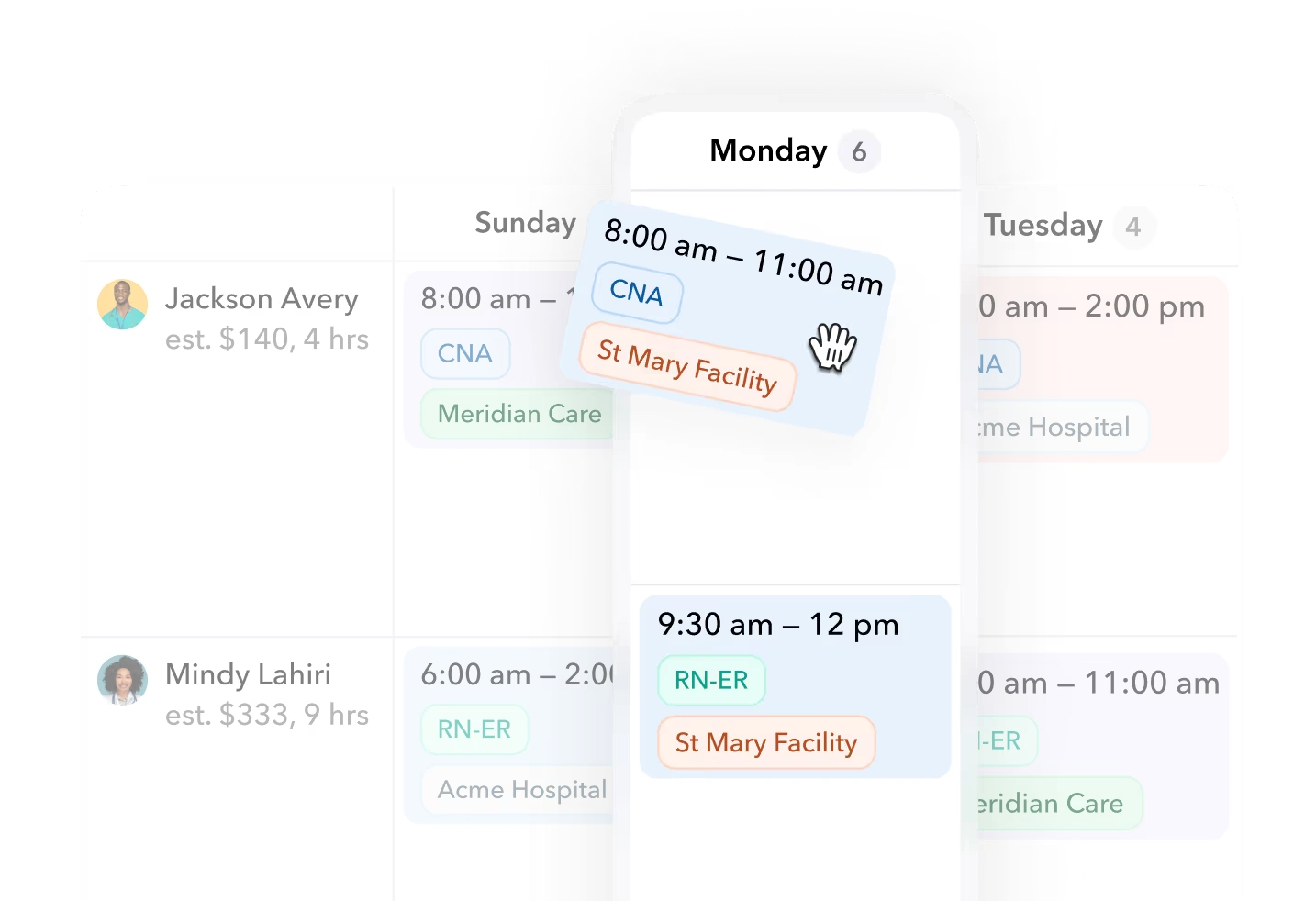
Teambridge’s documented example builds an eligible audience using worker and assignment fields, sends shift context, and returns a mobile claim to the live schedule as a confirmed assignment. Buyers should still demonstrate their own combinations of requirements and establish how exceptions are handled during implementation.
Teambridge scheduling view with worker rows and shift cards labeled by time, role, and facility.
The wider Teambridge platform is relevant when scheduling must connect with shared operational records, permissions, forms, and workflows. That broader scope does not establish that every adjacent function is included in a scheduling quote. Nor does the scheduling page prove offline operation, setup-free deployment, or universal enforcement of every qualification rule.
Ready to move?
Ready to see Teambridge in action?
Products discussed
Best Employee Scheduling Apps for Real Phone Self-Service tools mentioned
Official marks identify the products materially discussed in this section.
The required subscription matters more than the advertised entry price
A successful demonstration can still lead to the wrong purchase if it uses capabilities outside the quoted plan. Price the employee action and its manager controls together. A shift-claim button without the required approval permissions is not the same purchase as the complete workflow.
Connecteam’s seat-pricing documentation says additional seats are charged separately within paid hubs. It also says archiving or deleting employees does not automatically reduce purchased seats. Buyers need to confirm both the hub combination and who will maintain purchased seat quantities.
When I Work lists OpenShifts and swapping in Essentials, with additional controls in Pro. Its pricing page also describes the trial as access to everything. That means a trial success does not, by itself, prove inclusion in the intended subscription.
Decision framework
Three checks before selecting a system
Seat pricing
Pricing and FAQ
Treat When I Work’s attendance language as unresolved scope, not a confirmed product deficiency. Ask the vendor to reconcile the quoted billing unit, location treatment, and attendance inclusion in writing.
7shifts explicitly presents a restaurant-focused mobile scheduling offering. However, the reviewed pricing page did not establish reliable package inclusions. Do not assume scheduling, tasks, tips, or payroll-related functionality all come together because they appear under the same brand.
For Teambridge, request the assignment configuration, implementation responsibilities, and subscription scope together. The scheduling page says configuration is defined during implementation, but does not establish the effort or timeline for your operation.
Important
Get written confirmation of the employee actions, manager controls, attendance options, billing unit, and configuration included in the quote. Recheck package details before signing; unresolved scope should remain unresolved in your comparison until the vendor supplies evidence.
Use an employee-action friction log to expose work the demo hides
The most useful trial record is not a feature score. It is a record of what employees can finish, what managers must do, and where the result becomes visible. Use the same blank log for every finalist so a polished demonstration cannot substitute for a completed task.
Reusable artifact: employee-action friction log
Copy this table separately for each product and intended subscription. Leave untested cells blank rather than treating a salesperson’s “yes” as a result.
| Employee action | Completed on phone | Manager action required | Final schedule state visible | Required plan | Evidence captured |
|---|---|---|---|---|---|
| Submit availability | |||||
| Request a swap | |||||
| Claim an eligible shift | |||||
| Find site instructions |
Run the evaluation using both employee and manager accounts:
- Establish the intended subscription. Ask which trial capabilities exceed the quote and record the required plan for each action.
- Start on the employee’s phone. Attempt the task without asking the salesperson or manager to complete a hidden step elsewhere.
- Follow the handoff. Record any manager decision, the employee’s waiting state, and the eventual schedule or request status.
- Capture evidence. Save a screen recording, screenshot sequence, or exact documentation link that supports the recorded outcome.
For availability and site instructions, the final-state column may need a note rather than a schedule change. Availability could be visibly recorded without changing a published assignment; reading site instructions should not change the roster at all. Write what the employee and manager can actually verify.
Use a representative assignment with the requirements you genuinely operate, not an empty test schedule. Include a conflicting assignment or an unmet qualification where those conditions matter, and ask the vendor to demonstrate the outcome. Do not assume a warning is a block or a displayed shift is claimable.
Approval is not automatically friction to eliminate. A manager reviewing a replacement for a restricted site may be exercising necessary control. The avoidable work is missing status, duplicate entry, unclear ownership, or a separate text thread needed to discover whether the task finished.
Keep those distinctions in the manager-action column. “Manager approves replacement” describes a control. “Manager retypes the approved replacement into the schedule” describes additional work that needs an explanation.
Choose the app that leaves the right work with employees and managers
Connecteam merits evaluation when mobile crews need location details, instructions, and files with their assignments. Its documented job context is relevant to that work. The purchase tradeoff is verifying hub costs and demonstrating the complete claim or swap sequence rather than stopping at the mobile schedule.
When I Work merits evaluation when employee shift pickup and swapping drive the decision. Its Essentials and Pro distinction gives buyers a concrete place to investigate required controls. Confirm the tier, attendance scope, and trial-to-contract differences before treating a successful test as a purchasing answer.
7shifts merits evaluation when restaurant roles and workflows shape scheduling. Its Shift Pool documentation provides useful detail about permission scope, approvals, and notifications. Confirm package inclusions and decide whether the documented warning and notification behavior fits how your managers run service.
Teambridge merits evaluation when qualifications and site requirements determine assignment eligibility. The tradeoff is establishing configuration, implementation effort, and the boundaries of the quoted workflow. For that evaluation, bring your completed friction log to a Teambridge walkthrough and ask to reproduce the unresolved actions instead of taking a generic tour.
Choose only after the log shows that required employee actions work on the quoted plan and manager approvals are intentional. The right app does not remove managers from scheduling. It removes the unnecessary chasing around the decisions they still need to make.

Put this research into operation
Compare scheduling products in the main buyer guide before testing this article's specific workflow. employee scheduling app comparison.
About the author

Content Writer at Teambridge
Anis Nanai is a content writer at Teambridge, with a focus on workforce management and the realities of running hourly teams. He prioritizes conversations with customers, staying close to the market, and understanding how workforce needs are changing. His writing connects those concerns to practical decisions about scheduling, time tracking, staffing, and automation. He examines product developments through the questions that matter to operators: what does this solve, how would it work for my team, and what evidence supports it?
Company perspective: this author works at Teambridge. Customer outcomes are attributed to their published sources.
View LinkedIn profile