The best security guard scheduling software for your operation should make that distinction visible before you promise coverage. Start with what prevents an unsuitable assignment, not how quickly the system fills a calendar.
A filled security shift can still leave the client’s post uncovered
An available guard and an eligible guard are not necessarily the same person. Availability answers whether someone can work the hours. Post eligibility answers whether that person meets the requirements attached to this particular assignment.
That difference changes the buying process. A polished demonstration can show a scheduler filling an opening without establishing whether the software would reject an unsuitable worker. It can also show a warning without explaining whether the scheduler can ignore it.
Evaluate three connected decisions: how the system represents the post, when it checks the worker against that post, and what happens when a requirement is unmet. Keep the focus on assignment controls rather than treating scheduling software as a substitute for interpreting licensing obligations or client contracts.
This comparison uses vendor product pages and configuration documentation, not independent performance testing. Those sources establish documented capabilities and settings. They do not establish that every subscription, implementation, or assignment path behaves identically, and they do not support an overall winner.
Availability matching and post-level restrictions are different controls
TrackTik’s position documentation makes the enforcement distinction explicit. Positions sit under sites or zones and can carry hard, soft, and conditional requirements. Hard requirements block assignment, soft requirements warn without blocking, and conditional requirements require at least one of the listed qualifications.
That gives buyers a useful vocabulary. A requirement can be stored without being enforced, and a visible warning can leave the final decision with dispatch. Ask which behavior applies to each client restriction rather than accepting “qualification matching” as a complete answer.
Deputy’s security scheduling page advertises automatic shift filling based on availability, stress profiles, and training. That supports evaluating Deputy for matching workers to shifts. It does not, by itself, establish that a training requirement blocks every manual assignment or is rechecked through every replacement workflow.
Guardhouse’s product explanation describes client-site role templates, required licenses and qualifications, and scheduling flags. It also documents a configurable “Dead Stop” that prevents scheduling at sites with a compliance issue when enabled. Characterizing Guardhouse as warnings-only would miss an important documented control.
Decision framework
Three checks before selecting a system
TrackTik positions
Teambridge security scheduling
Guardhouse product explanation
These are different kinds of evidence: documented enforcement behavior, configuration scope, and an unresolved verification claim. None proves how the buyer’s final implementation will handle every exception. Require demonstrations of blocked assignments, warnings, and override permissions using the same post requirements.
Important
A rule is not proven by showing an eligible worker being assigned. Ask the vendor to attempt an unsuitable assignment and show what happens next, including who can override the result.
Deputy, TrackTik, Guardhouse, and Teambridge represent coverage differently
The useful comparison is not which vendor uses the word “security.” It is how each product connects the shift, the worker, and the post’s restrictions, plus what you must purchase or configure to make that connection operational.
| Product | Documented scheduling approach | Post-requirement handling | Purchasing dependency | Unresolved proof |
|---|---|---|---|---|
| Deputy | Multi-location scheduling, availability and training-based auto-fill, replacement alerts, and mobile swaps | Training informs advertised matching; the security page does not establish equivalent hard and soft post restrictions | Confirm the plan needed for auto-scheduling and other required functions | Mandatory restriction behavior during manual assignment, replacement, and override |
| TrackTik | Scheduling and Timekeeping alongside security field-operation functions | Position-level hard, soft, and conditional requirements | Scheduling and Timekeeping is an optional module | Buyer-specific rule setup, assignment paths, and permissions |
| Guardhouse | Scheduling visibility into availability, overtime, fatigue, qualifications, and conflicting shifts | Client-site role templates, flags, and a configurable Dead Stop | Quote required functions and enabled restriction settings | US license-check coverage, failed-check handling, and enabled blocking behavior |
| Teambridge | Shift creation, availability review, open shifts, and mobile schedule actions | Security eligibility, approvals, coverage rules, and outreach timing depend on configuration | Confirm workflow configuration and implementation-dependent connections | Checks at each assignment stage, approval ownership, and external record dependencies |
Sources: Deputy security scheduling, Deputy pricing, TrackTik positions, TrackTik features, Guardhouse product explanation, and Teambridge security scheduling.
Deputy is an evaluation path when the immediate problem is coordinating availability, replacements, attendance, and payroll exports. TrackTik deserves investigation when position restrictions and guard-tour functions both belong in the purchasing discussion. Guardhouse merits a closer look when client-site role requirements and field reporting need shared operational context.
Teambridge is an option when the priority is configurable workforce coordination around locations, roles, open shifts, approvals, and outreach. Its security scheduling documentation distinguishes standard schedule actions from configured security rules. A mobile claim may be immediate or require approval, depending on the workflow.
These are starting points for evaluation, not superiority claims. A vendor’s documented breadth does not remove the need to prove the specific restriction that dispatch must enforce.
Ready to move?
Ready to see Teambridge in action?
Products discussed
Best Security Guard Scheduling Software: Who Can Cover a Post? tools mentioned
Official marks identify the products materially discussed in this section.
A GPS clock-in does not establish that a patrol was completed
Attendance, patrol verification, and incident reporting answer different operational questions. Attendance records whether a worker clocked in, potentially with location information. Patrol verification records checkpoint activity, while incident reporting captures what happened and the associated report.
Deputy documents GPS clock-ins, but that security page does not establish native checkpoint tours or incident reporting. Those capabilities are unverified from this source, not proven unavailable. Ask for separate product evidence if either function is a purchase requirement.
TrackTik’s feature documentation describes a Guard Tour System with checkpoint scanning and reports, alongside its optional Scheduling and Timekeeping module. Guardhouse describes QR and NFC checkpoint scanning, tour reports, and mobile incident reports. Those functions extend beyond confirming attendance, but their documentation still does not establish every buyer’s reporting or contractual requirements.
A clock-in record answers an attendance question. It does not, by itself, answer whether the required patrol happened.
Teambridge states that it coordinates workforce operations around guard-tour, incident, payroll, and client systems rather than replacing every system of record. Its security scheduling page also makes integration scope implementation-dependent. Do not assume a patrol record flows into a scheduling workflow without confirming that connection.
Retaining a separate patrol system can therefore be a bounded architecture choice, not a scheduling failure. The decision needs an explicit owner for patrol records, a clear way to identify the associated assignment, and a defined response when records disagree. Otherwise, dispatch inherits reconciliation work that the purchasing discussion never acknowledged.
Translate one real post specification into vendor-verifiable rules
Bring an actual client post specification to each finalist. Use the same document and the same assignment paths so the demonstrations answer a common operating question. A vendor-selected sample can show the interface without testing your restrictions.
Post Requirement Translation Sheet
Copy this sheet and add one row for each requirement. Leave the requirement wording intact until the operational owner agrees on how it should translate into system behavior.
| Client requirement | Vendor representation | Enforcement point | Override owner | Demonstrated evidence |
|---|---|---|---|---|
In Vendor representation, record whether the requirement becomes a stored field, an enforced rule, or an external dependency. In Enforcement point, identify whether the check occurs at publication, worker claim, assignment, or later review. Those distinctions expose whether the software prevents a problem or merely helps someone find it afterward.
Use Override owner to name the buyer-side role responsible for exceptions and record whether the demonstrated permissions match that responsibility. In Demonstrated evidence, retain a recording timestamp, configuration reference, or an explicit unresolved question. A blank cell is not a pass.
Run the sheet through a short, consistent demonstration:
- Translate the requirement. Have the vendor show the field, rule, or external record that represents it, including who maintains that information.
- Attempt an unsuitable assignment. Test the assignment paths your team actually uses, including manual changes and worker claims where applicable. Record whether the system blocks, warns, routes for approval, or permits the action.
- Inspect the exception. Identify override authority and what remains visible afterward. Ask how changed or missing information affects an already published assignment, and retain any unanswered question in the same sheet.
This is one operating artifact, not another feature scorecard. Its value is traceability from the client’s words to demonstrated behavior. If a requirement remains a manual review, document it honestly rather than treating a configurable field as proof of enforcement.
Quote the subscription and configuration that enforce your post rules
The completed sheet should drive the commercial scope. Ask the vendor to identify which subscription, module, configuration work, and external dependency supports each required control. A quote that names only the platform leaves too much of the operating design unstated.
Deputy’s pricing page lists shift swaps, replacement finding, and availability management in Lite. Core adds auto-scheduling, micro-scheduling, demand forecasting, and wage and labor budgets. If the demonstration depends on automatic scheduling, do not assume the entry tier includes it.
TrackTik identifies Scheduling and Timekeeping as optional. Have the quote name that module and the position-requirement setup needed for your posts. The existence of guard-tour functionality does not establish that scheduling is included in the proposed package.
For Guardhouse, get license-check coverage in writing. Although the reviewed page uses a US URL, its detailed daily-check language names Australian jurisdictions and references an SIA database. That does not establish supported US jurisdictions.
Request independent answers for:
- Supported jurisdictions and the underlying verification sources.
- Refresh timing and the treatment of stale, missing, or failed checks.
- Whether the relevant issue triggers a warning or an enabled scheduling block.
For Teambridge, confirm the fields, eligibility rules, approval ownership, and outreach timing included in implementation. Its scheduling workspace is relevant to managing workers, shifts, roles, and locations. Security-specific enforcement and external connections still need their own documented scope.
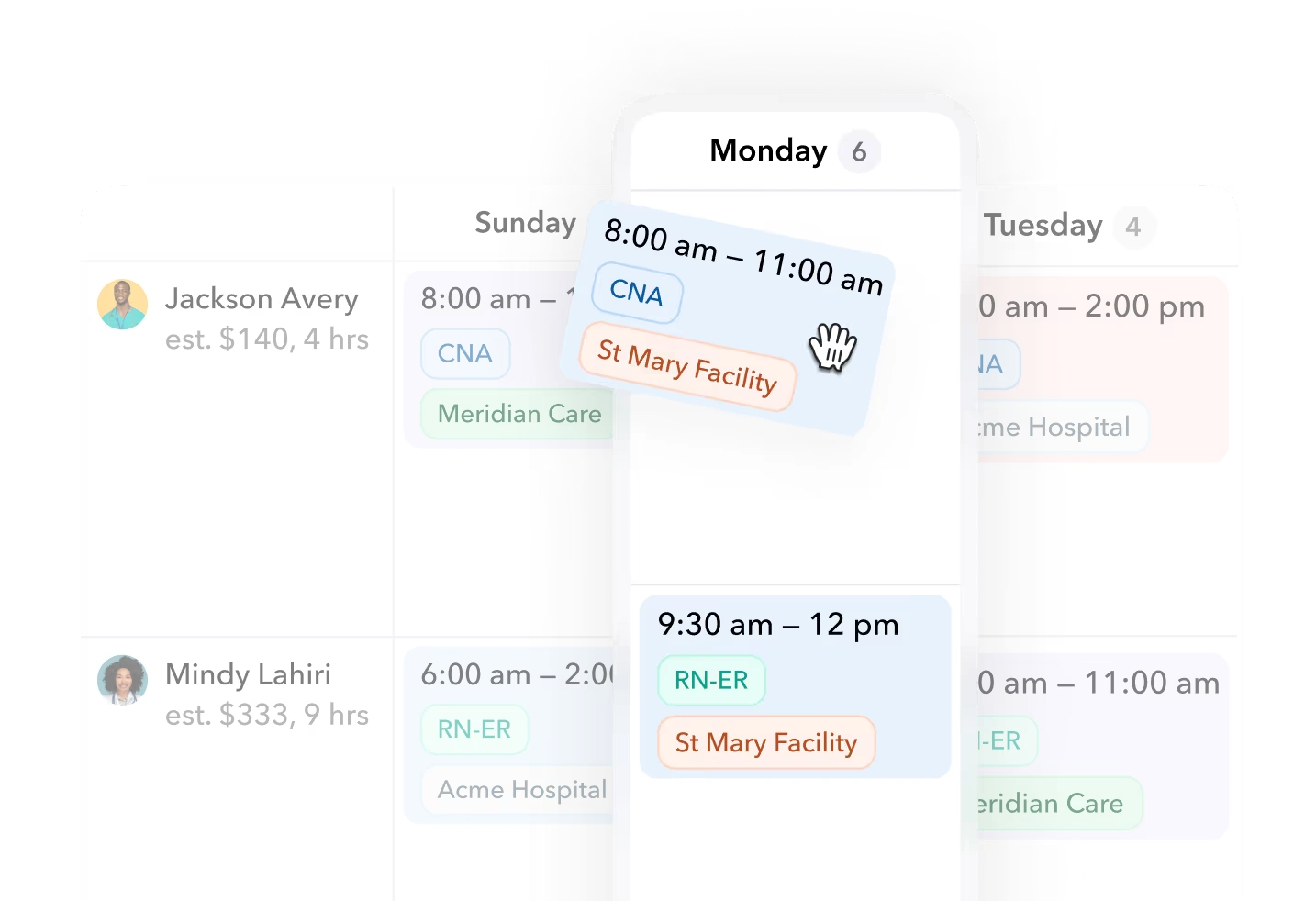
Teambridge scheduling view with healthcare example records. This image illustrates the scheduling workspace, not a security-specific configuration or proof of eligibility enforcement.
Do not infer total cost from an entry tier or a broad product description. Require the proposal to distinguish included functionality, configured controls, buyer-owned work, and connections that remain subject to implementation discovery.
Shortlist only after the vendor demonstrates your post restrictions
Investigate Deputy when scheduling and attendance coordination are the primary buying needs. Investigate TrackTik or Guardhouse when security field-operation context belongs in the same evaluation. Investigate Teambridge when configurable workforce coordination is the priority and the ownership of adjacent systems can be made explicit.
These are evaluation paths grounded in vendor documentation, not tested rankings. Before signing, require each finalist to demonstrate the restrictions from your actual post specification and the exception behavior dispatch will encounter under pressure. Keep unresolved dependencies in the Post Requirement Translation Sheet rather than allowing them to disappear into meeting notes.
For a Teambridge evaluation, use its security industry context to frame the workflow, then request a walkthrough using your own post specification. Ask the team to establish what prevents an unsuitable assignment, who owns overrides, and which system retains patrol records.
The deciding evidence is not a full calendar. It is a demonstrated restriction, an accountable exception owner, and a purchasing scope that includes the controls your operation intends to rely on.

About the author

Content Writer at Teambridge
Anis Nanai is a content writer at Teambridge, with a focus on workforce management and the realities of running hourly teams. He prioritizes conversations with customers, staying close to the market, and understanding how workforce needs are changing. His writing connects those concerns to practical decisions about scheduling, time tracking, staffing, and automation. He examines product developments through the questions that matter to operators: what does this solve, how would it work for my team, and what evidence supports it?
Company perspective: this author works at Teambridge. Customer outcomes are attributed to their published sources.
View LinkedIn profile