

This explainer follows the punch through the full chain so you can evaluate time clock apps on payroll outcomes instead of feature checklists.
What an employee time clock app actually records
An employee time clock app is a mobile or kiosk application that captures clock-in, clock-out, breaks, and usually location for hourly workers. It replaces the three tools most hourly operations grew up on: paper sign-in sheets, shared PIN clocks, and swipe cards.
All three legacy methods share one failure mode: they record what someone typed, swiped, or wrote, not what actually happened. That gap is expensive. Nucleus Research estimates buddy punching, where one worker clocks in for an absent coworker, adds roughly 2.2% to gross payroll, and surveys cited across payroll research put the share of U.S. businesses losing money to it at around 75% (compiled statistics). On a $1.2 million annual payroll, 2.2% is about $26,400 a year in wages paid for hours nobody worked.
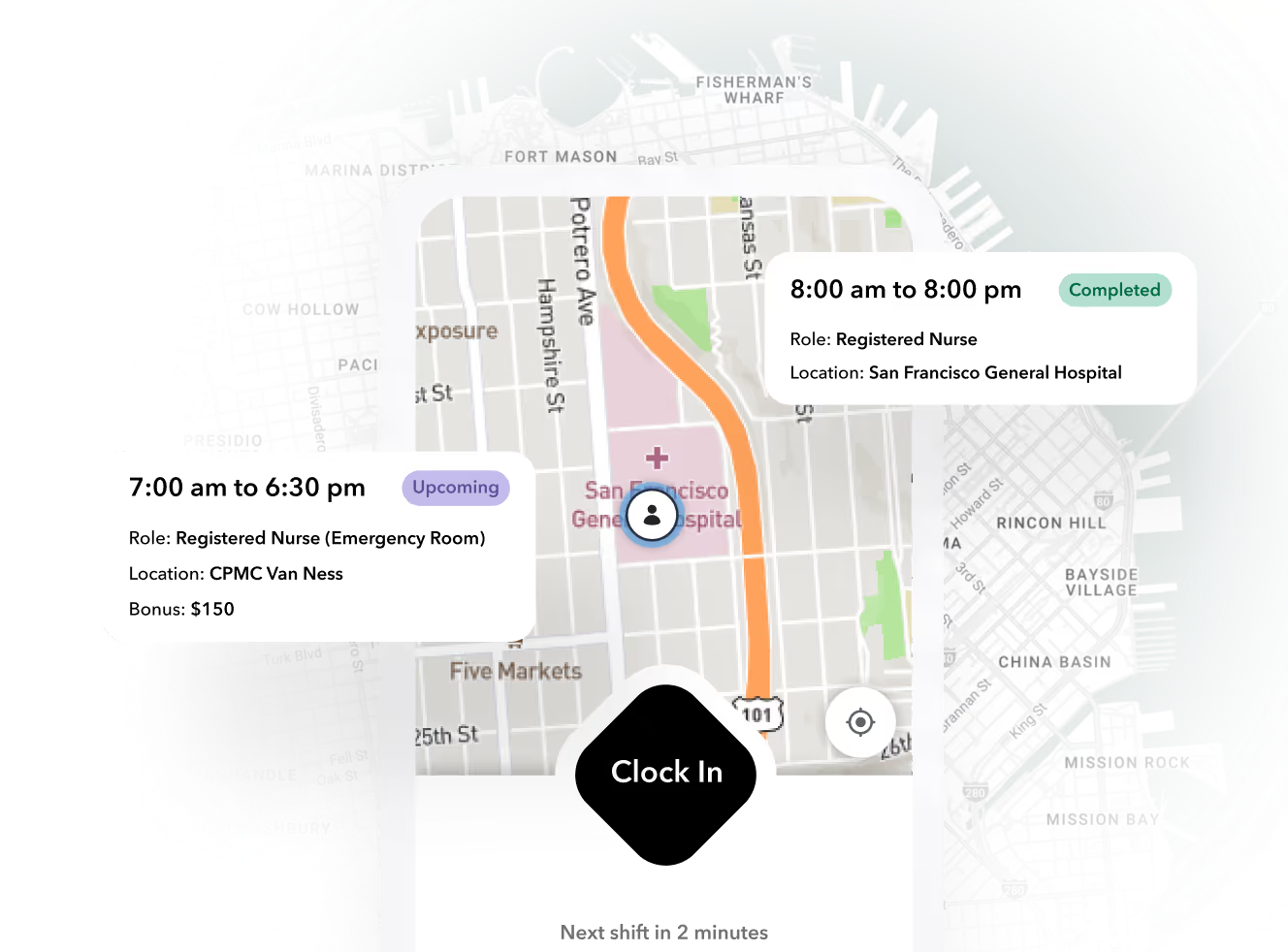
GPS-verified capture, like the clock-in flow on the Teambridge time tracking product, closes the identity and location half of that gap. A worker punches from their own phone, inside a geofence, under their own account. That is the easy part, and nearly every vendor now does it.
The harder part is everything downstream. The Fair Labor Standards Act requires employers to keep accurate records of hours worked each day and each workweek, and to retain timecards and wage computation records for at least two years (DOL Fact Sheet #21). Accurate does not mean recorded. It means the record survives review. That is the frame for the rest of this article: judge the app on what it does with the punch after it lands.
From punch to paycheck: the workflow in five steps
Here is the full chain a punch travels in a well-run operation. Use it as a checklist on any demo: ask the vendor to show each step live, with real data, not a slide.
- Capture. The worker clocks in from their phone. The system validates identity (their device, their login) and location (GPS pin or geofence around the site). Rejected punches tell the worker immediately instead of failing silently into payroll.
- Flag. The system compares each punch against the schedule and generates exceptions: missed punches, early arrivals, late departures, wrong location, unscheduled shifts.
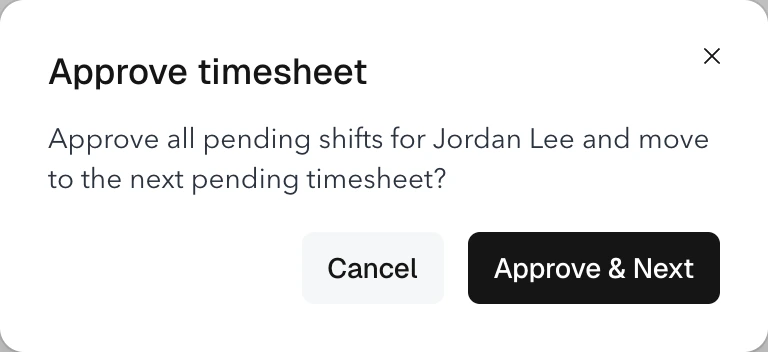
- Resolve. A supervisor works an exception queue, approving or correcting flagged punches against what actually happened on site. This is where most generic apps get thin.
- Calculate. Approved timecards feed overtime, premium, and break rules. State rules differ, and staffing agencies often have client-specific premium rules on top of state rules.
- Export and bill. Clean hours go to payroll. For staffing and multi-site operators, the same approved hours should also drive client invoicing.
Step five is where the category splits. Generic time clock apps end the chain at a payroll export. Operations platforms continue it into billing, because an approved timecard is also proof of service the client pays against. The Teambridge invoicing product, for example, generates client invoices directly from approved timecards with bill rates and burden applied, then exports to QuickBooks or NetSuite. If you bill clients for hours, an app that stops at payroll export leaves you re-keying the same numbers into a second system every week.
Ready to move?
Ready to see Teambridge in action?
Worked scenario: 40 security guards across three sites
This is a hypothetical illustration, not a customer result. Assumptions: a security firm runs 40 guards at $19/hour across three client sites, five shifts per week per guard, single site supervisor per site.
The unprotected week. Six guards develop a habit of clocking in from the parking lot 12 minutes early, or having the guard they relieve punch them in. One site supervisor approves timecards in bulk on Friday without checking locations. The math:
- 12 minutes x 6 guards x 5 shifts = 360 minutes = 6 unearned hours per week
- 6 hours x $19 = $114 per week
- $114 x 52 = $5,928 per year at straight time
The straight-time number understates it. If those 12-minute head starts push two guards past 40 hours in a week, that time pays at 1.5x, so the annual figure climbs toward $7,000. And the firm is billing clients against those inflated timecards, which turns a payroll leak into a contract risk if a client ever audits.
The replay with geofencing and an exception queue. The parking-lot punch fails at capture: outside the geofence, the app rejects it and tells the guard to move to the post. The relief-punch fails at identity: one phone, one account. The supervisor's Friday bulk-approval now routes through an exception queue showing only flagged punches, so the review takes minutes instead of being skipped entirely. Weekly leakage from this pattern drops to roughly zero, and the timecards the client sees match site reality.
Important
The leak is rarely one big fraudulent shift. It is 10 to 15 minutes per offender per day, which is small enough to approve without looking and large enough to cost 2% of payroll annually. Any evaluation that only asks "can workers clock in on their phone" misses the mechanism that actually saves money: exception review a supervisor will realistically complete.
Where Connecteam, When I Work, and ops platforms split
These three represent the three real buying options, and they serve different operators. This is a category comparison based on published product documentation and reviews, not a benchmark test.
| Connecteam | When I Work | Operations platform (e.g., Teambridge) | |
|---|---|---|---|
| Core strength | All-in-one app for deskless SMB teams | Scheduling plus time clock at low per-user price | Timecards driving payroll and client billing across sites |
| Location validation | GPS and geofencing | GPS and geofencing | GPS, geofence, credential checks at clock-in |
| Payroll | No native payroll; exports to providers | Exports to common payroll providers | Export plus native pay workflows depending on setup |
| Client invoicing from timecards | Not the focus | Not the focus | Built in: bill rates, burden, spread |
| Best fit | Single-location or small multi-site teams needing one app for everything | Teams that already have payroll and billing handled | Staffing agencies and multi-site operators billing hours to clients |
| Watch for | Reporting depth and admin controls at scale | Fewer ops controls beyond schedule and punch | Overkill if you just need a cheap punch button |
Connecteam earns its reviews on mobile adoption and breadth for small deskless teams, and its free tier is genuinely useful for very small operations. When I Work is a clean choice when scheduling is the pain and payroll already works. The Teambridge platform is built for the third case: shift-based operators where an approved timecard has to become an invoice, where a guard without a valid license should not be able to clock into a licensed post, and where overtime rules vary by client contract.
The honest boundary: if you run one location with 15 people and just need punches into QuickBooks, an operations platform is more system than you need. Buy for the workflow you actually have.
The five questions that separate a punch button from payroll infrastructure
Bring these to every demo, including ours. Score each vendor 0 to 2 per question and walk away from anything under 7.
- Does it validate location at clock-in, and can workers see their own punches? Worker-visible timecards kill most disputes before they reach your office.
- What happens to a missed punch, and who resolves it? Ask to see the exception queue with sample volume, not a settings page.
- How are overtime and break rules configured per state or per client contract? If the answer is "one global rule set," multi-state or staffing operations will bleed.
- Does approved time flow directly to billing, or only to a payroll export? For anyone invoicing hours, this is the difference between one source of truth and weekly reconciliation.
- What does the exception queue look like on a Monday morning with 200 workers? Bulk actions, filters by site and client, and supervisor assignment matter more at 200 punches than any capture feature.
Scoring sheet you can copy
| Question | Vendor A | Vendor B | Vendor C |
|---|---|---|---|
| Location validation + worker visibility (0-2) | |||
| Missed-punch resolution path (0-2) | |||
| Overtime/break rules per state or client (0-2) | |||
| Timecard-to-billing flow (0-2) | |||
| Exception queue at 200-worker volume (0-2) | |||
| Total (buy at 7+) |
What to do after you pick one
Pilot at one site or one client account, not the whole company. Before go-live, spend two weeks baselining your current numbers: exception volume per week, payroll correction rate, and hours spent reconciling timecards. Then measure the same three numbers for the two weeks after. Without the baseline, you will never be able to prove or disprove the purchase.
Two rollout rules that save pain:
- Set geofences generously for week one, then tighten. Workers hitting false rejections in week one will poison adoption faster than any feature gap.
- Assign exception queues to named supervisors with a daily cutoff. An unowned queue becomes the new paper timesheet.
The emerging layer on top is AI-assisted exception handling: flagging problem punches and routing them before payroll cutoff instead of after. Teambridge's AI Specialists work in this direction, running exception review continuously in the background. Treat that as an accelerant on top of a sound workflow, not a substitute for one.
If you want to see the punch-to-paycheck chain live, the time tracking page walks through capture, exceptions, and overtime calculation, and the Teambridge blog has deeper dives on scheduling and compliance workflows. Whatever you buy, buy it against the five questions above, not against the clock-in screen.

About the author

Content Writer at Teambridge
Anis Nanai is a content writer at Teambridge, with a focus on workforce management and the realities of running hourly teams. He prioritizes conversations with customers, staying close to the market, and understanding how workforce needs are changing. His writing connects those concerns to practical decisions about scheduling, time tracking, staffing, and automation. He examines product developments through the questions that matter to operators: what does this solve, how would it work for my team, and what evidence supports it?
Company perspective: this author works at Teambridge. Customer outcomes are attributed to their published sources.
View LinkedIn profile