

Reviewed September 2026
2026 update: treat time theft as an exception workflow
A suspicious time record is not proof of misconduct. Location errors, missed punches, unclear break rules, schedule changes, and manager corrections can create the same signal. The strongest control system preserves context, routes exceptions for review, and records the decision before payroll.
Define the policy
Document clock rules, approved locations, break expectations, correction procedures, and who can change a time record.
Compare schedule and time
Flag early starts, late finishes, missing punches, unplanned work, and material differences from the assigned shift.
Use location as context
Review clock location against the configured work site while accounting for device accuracy and legitimate field exceptions.
Protect the original record
Keep the submitted time, correction, reason, reviewer, and approval history available for audit and dispute resolution.
Apply consistent review
Route comparable exceptions through the same evidence and approval process instead of relying on selective monitoring.
Write a warning from verified facts
A written warning for time theft should identify the date, policy, verified records, employee response, expected correction, and next review without presenting an unresolved suspicion as fact.
Measure the workflow
Track exception frequency, correction time, repeat patterns, and payroll impact without treating every variance as theft.
Product boundary
Teambridge can connect schedules, mobile clock events, configured location rules, timecard corrections, approvals, and audit history. It does not determine employee intent, provide legal conclusions, or replace a fair investigation and wage compliance process.
“Time theft” may sound like a harsh label for something as small as rounding a time stamp from 12:23 to 12:30 p.m. before heading to lunch. But if 15 employees each do that three times a week, that seemingly harmless seven minutes suddenly turns to over five hours of lost productivity each week. That’s more than 20 lost hours per month.
False time records—whether accidental or intentional—can have the same financial impact as an employee stealing materials and equipment from your office. You end up paying team members for time they didn’t work and lose money from lost productivity during the workday. Inaccurate recordkeeping can also expose you to legal or compliance risks.
To overcome time theft, you first need to learn how to recognize its many forms.
What is time theft?
Time theft is when team members are paid for time they didn’t work. This can be intentional, such as knowingly falsifying a timesheet, or unintentional, like losing track of time during a break.
According to a 2025 report by Business.com, nearly a quarter (24%) of US workers say they overreport or manipulate the number of hours they work when time tracking. This leads to an average of 4.5 hours of stolen time each week for those team members.
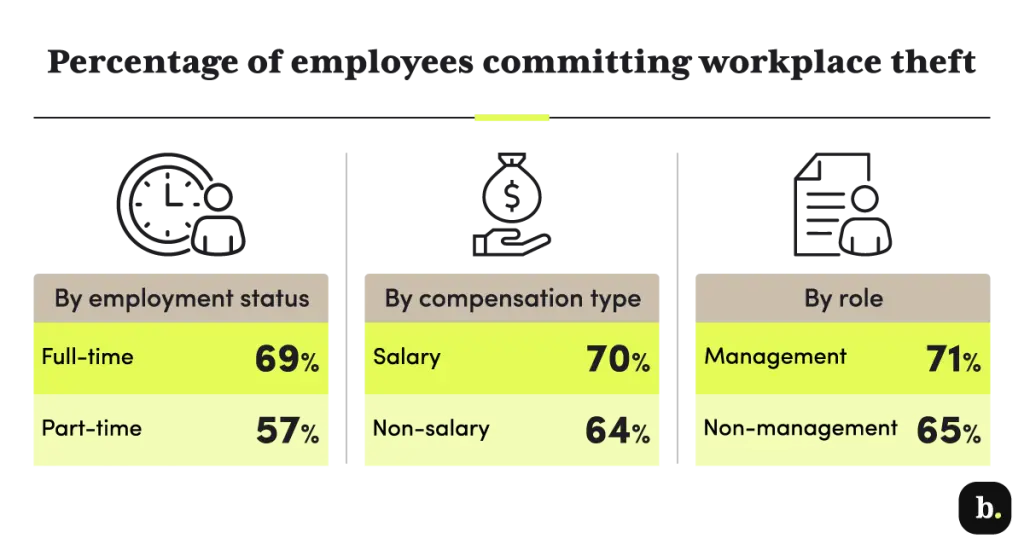
A chart from Business.com shows the percentage of employees committing time theft by employment status. (Source)
Left unaddressed, time theft can cause significant problems for employers, including financial losses, reduced productivity, and a culture of dishonesty.
7 common forms of time theft
Employee time theft can take many forms—some more obvious than others. This is especially true within the complexities of a blended workforce, where workers may have varying rules for tracking time based on their employment status.
Here are seven common examples of time theft to watch for.
1. Buddy punching and proxy clock-ins
Buddy-punching happens when one worker clocks in or out on behalf of another, usually to cover for someone who’s running late or leaving early. This creates a false time record and costs your company money.
A 2024 study published in Human Resource and Leadership Journal reports roughly 75% of businesses lose money to buddy punching, with an average loss of $1,560 per employee per year.
2. Unauthorized breaks and extended lunches
Staff and employees can steal time by taking breaks that aren’t scheduled or extending ones that are.
For example, let’s say a healthcare staffing professional comes back from lunch 10 minutes late. They then take two extra breaks of 15-minutes to stretch their legs and spend another 5 minutes chatting with a co-worker. That’s 45 minutes of their organization’s time.
Other common examples of unauthorized breaks include smoke breaks and coffee runs, things that seem minor on their own but add up to hours of lost time each week.
3. Personal device distractions on company time
Time theft can happen right at employees’ desks. Staff browsing their social media, online shopping, or taking personal calls on the clock are also misusing company time.
Even if someone only checks their smartphone notifications five minutes out of every hour, that’s 40 minutes of lost productivity during every eight-hour workday, adding up to well over three hours per standard work week.
4. Early clock-outs and “ghost” shift coverage
A team member may leave work early but record a later clock-out time to make it look like they worked longer than they did. Or they could show up late and fudge their clock-in time to indicate otherwise. Both scenarios are forms of wage theft.
In more serious cases, someone might log time for a shift they didn’t actually work or ask a co-worker to punch in on their behalf. These behaviors not only distort payroll but can also create legal risk around recordkeeping compliance.
5. Inflated timesheet entries
Employees might inflate their timesheets to add extra time throughout the work week. This can include rounding up work hours to the nearest quarter or half hour, claiming overtime they didn't earn, or not recording their breaks. Over time, these small adjustments can lead to significant financial losses, especially for small businesses.
6. “On-call” downtime and off-the-clock work
It can be easy for workers to claim they spent time working on projects after hours or while they were assigned “on-call” responsibilities, since that work takes place outside of the typical work environment. Employees and staff may take advantage of the situation by recording on-call incidents that didn’t happen or other work they didn’t actually do. Without proper oversight, these hours can be hard to verify.
7. Misuse of sick time and extended breaks
Time fraud can also come in the form of misusing paid time that’s set aside for other purposes. For example, some team members may take last-minute sick days to attend an event or enjoy a vacation day without using their paid time off (PTO). They may also run personal errands after their lunch breaks, taking a few extra minutes each day that add up over the course of a week or month.
The legal landmines of time theft: Compliance risks exposed
In addition to increased labor costs that impact your bottom line, time theft can also lead to workforce compliance issues and legal problems. These risks are mostly related to violations of wage and hour laws and inaccurate recordkeeping.
For example, the Fair Labor Standards Act (FLSA) requires covered employers to keep accurate records about the hours employees work each day and week. Inaccurate timekeeping can result in fines, audits, and legal action, especially if there’s evidence that a record was intentionally falsified.
Since several federal laws and state-level labor laws have similar regulations, it's critical to catch time fraud before it leads to a larger issue.
How to detect time theft: 3 proven methods
Uncovering time theft can be complex. After all, you can’t stand at the time clock all day.
Thanks to advancements in workforce technology, you don’t have to. Here are three tools you can use to help you find and prove time fraud before it becomes a bigger issue.
Timesheet exception reporting and analytics
Some forward-looking workforce management and time-tracking software solutions offer timesheet exception reporting. This process identifies and tags shifts that deviate from a team member’s expected schedule.
For example, Teambridge automatically flags late arrivals, early departures, and no shows based on clock-in and clock-out data and scheduled times. This helps you identify potential issues before running payroll.
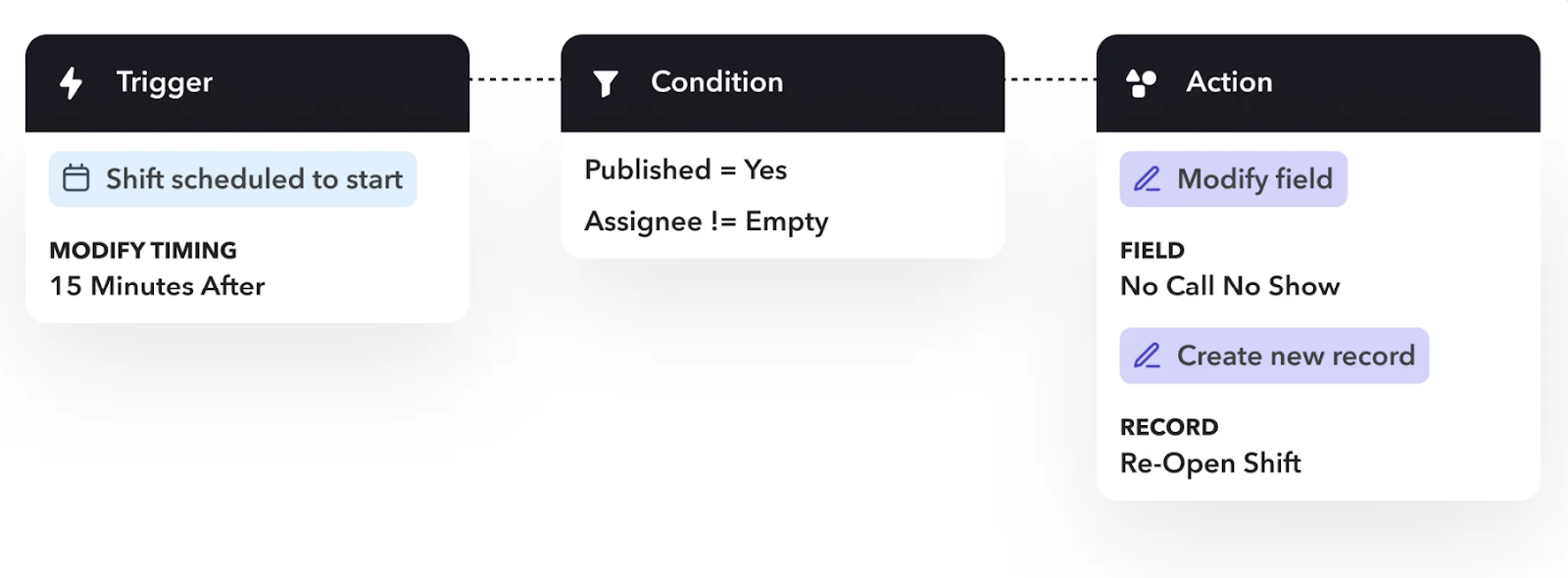
An example of Teambridge’s automation workflow for tagging a no-show shift.
Geofencing and GPS-enabled clock-ins
Some mobile time tracking apps let you verify each worker’s location when they clock in. This way, you know each team member was at the worksite when their time stamp was recorded, eliminating the potential for buddy-punching.
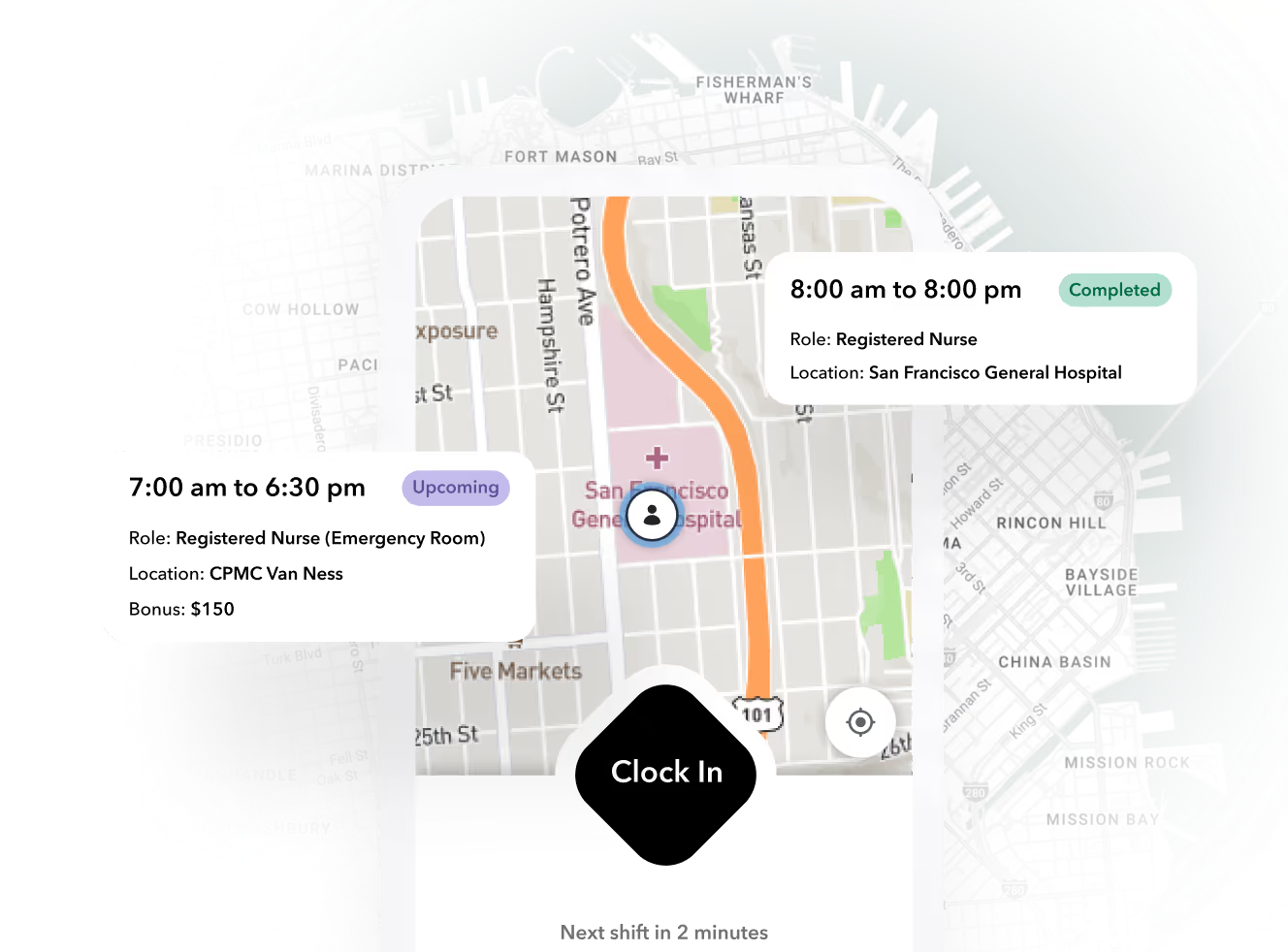
Teambridge takes this a step further by offering a geofencing employee mobile app that creates virtual boundaries around a worksite. Using GPS tracking, the app can automatically clock employees in and out as they enter and exit their physical work environment. This ensures all time stamps are correct.
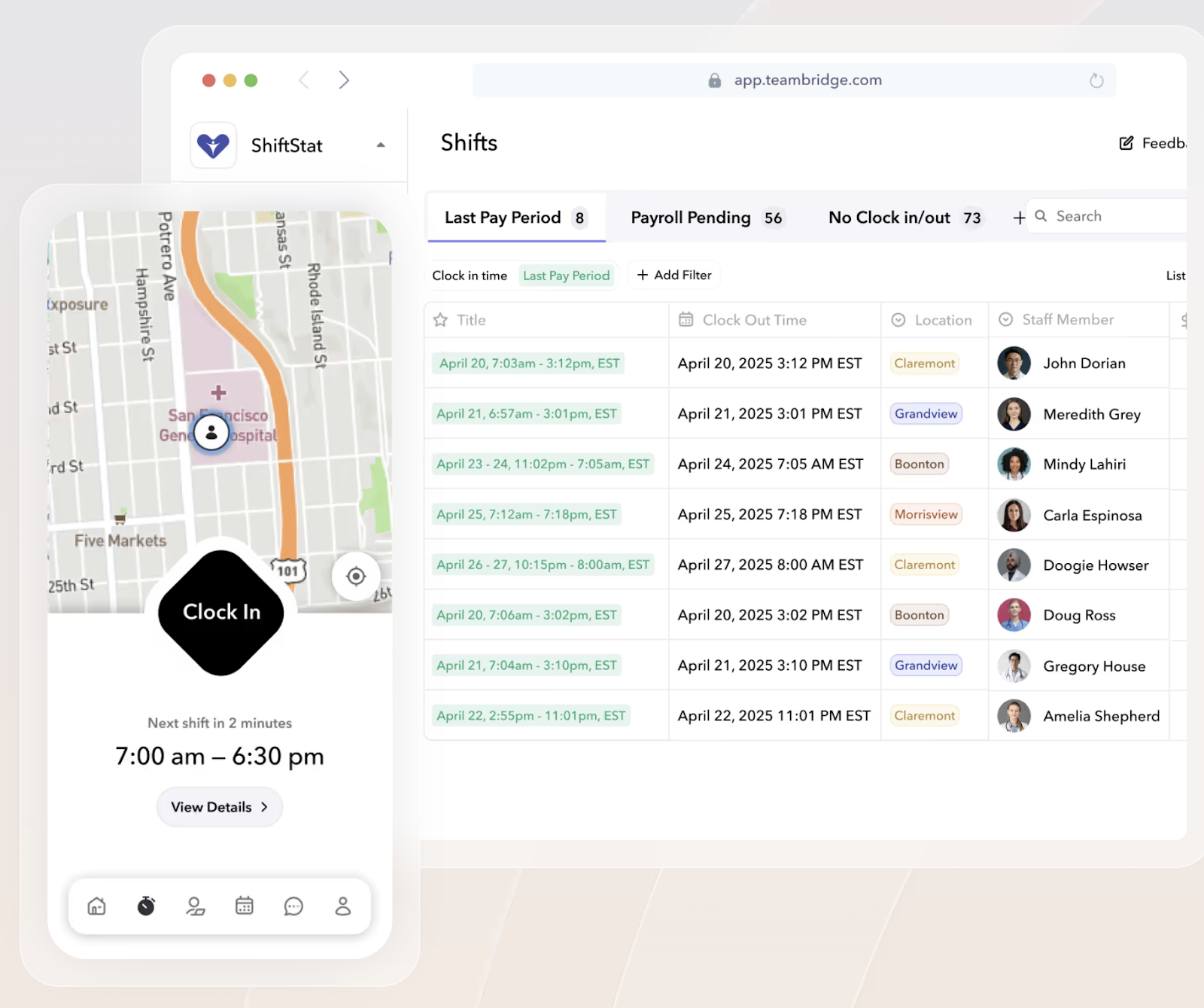
A sample view of Teambridge’s geofencing time clock for the employee and employer.
Predictive analytics for anomaly detection
Time tracking systems with predictive analytics tools can analyze historical timekeeping data to identify unusual patterns in team member time entries. They use past data to forecast future time stamps and flag any major discrepancies, so you can check them for errors or fraud.
Beyond detecting time theft, predictive analytics and anomaly detection can also help reveal inefficiencies in workflows and show how employees actually spend their time.
A multi-layered approach to preventing time theft
While detection tools help catch time theft after it happens, the best way to avoid it is through prevention. Here are some proactive steps you can take to discourage time fraud among your workforce.
Clear policies and employee education
Include clear time tracking guidelines and expectations in your company policies. Create a time theft policy that gives specific examples of time theft, such as:
- Using work time for personal activities, including during remote work
- Taking longer break times than authorized
- Rounding up time stamps to the nearest quarter-hour mark
- Shopping online during work hours
- Punching in before you actually arrive
- Taking phone calls that aren’t work-related while on the clock
Clearly lay out the consequences of time theft for any team members caught falsifying their records, whether that includes a written warning, disciplinary action, or termination. Remind them that time fraud is a form of employee theft that’s no different than stealing materials from the company.
Once you have a solid policy in place, share it widely. Include it in your employee handbook, onboarding materials, and company intranet so it's always accessible.
Automated alerts and real-time monitoring
Use workforce management software to set up automated alerts when a time record seems off compared to expectations. This way, you can address potential time fraud before it impacts your bottom line or creates compliance issues.
Regular audits and spot checks
Even if you use automation, conduct regular audits of your time records and payroll to make sure nothing is slipping through the cracks. As a business owner, it’s far better for you to catch time theft during an internal audit versus an external one.
Detect and eliminate time theft within your company
Time theft can cause huge problems for your business. What might only seem like a few minutes here and there quickly adds up, impacting your financial health, company reputation, and employee morale.
Teambridge helps you stop time theft before it starts. With features like geofencing technology in its mobile time clock app and customizable shift fields, break rules, and approval workflows, it gives you complete control over tracking employee timesheets to protect your business performance.
Get an overview of how you can automate shift tagging to keep track of attendance outcomes and get a handle on time theft.

Put this research into operation
Review a timecard file for missing fields, duplicate rows, long durations, and unusual time entries. timecard anomaly scanner.
Recalculate daily punches, unpaid breaks, weekly hours, and overtime with every assumption visible. time card calculator.
Connect the scheduled shift, clock event, exception, correction, approval, and downstream handoff. time and attendance software.
Use configured work locations as review context while preserving legitimate field exceptions and manager judgment. GPS time clock controls.
About the author

Content Writer at Teambridge
Anis Nanai is a content writer at Teambridge, with a focus on workforce management and the realities of running hourly teams. He prioritizes conversations with customers, staying close to the market, and understanding how workforce needs are changing. His writing connects those concerns to practical decisions about scheduling, time tracking, staffing, and automation. He examines product developments through the questions that matter to operators: what does this solve, how would it work for my team, and what evidence supports it?
Company perspective: this author works at Teambridge. Customer outcomes are attributed to their published sources.
View LinkedIn profile