

Defining "Geofencing"
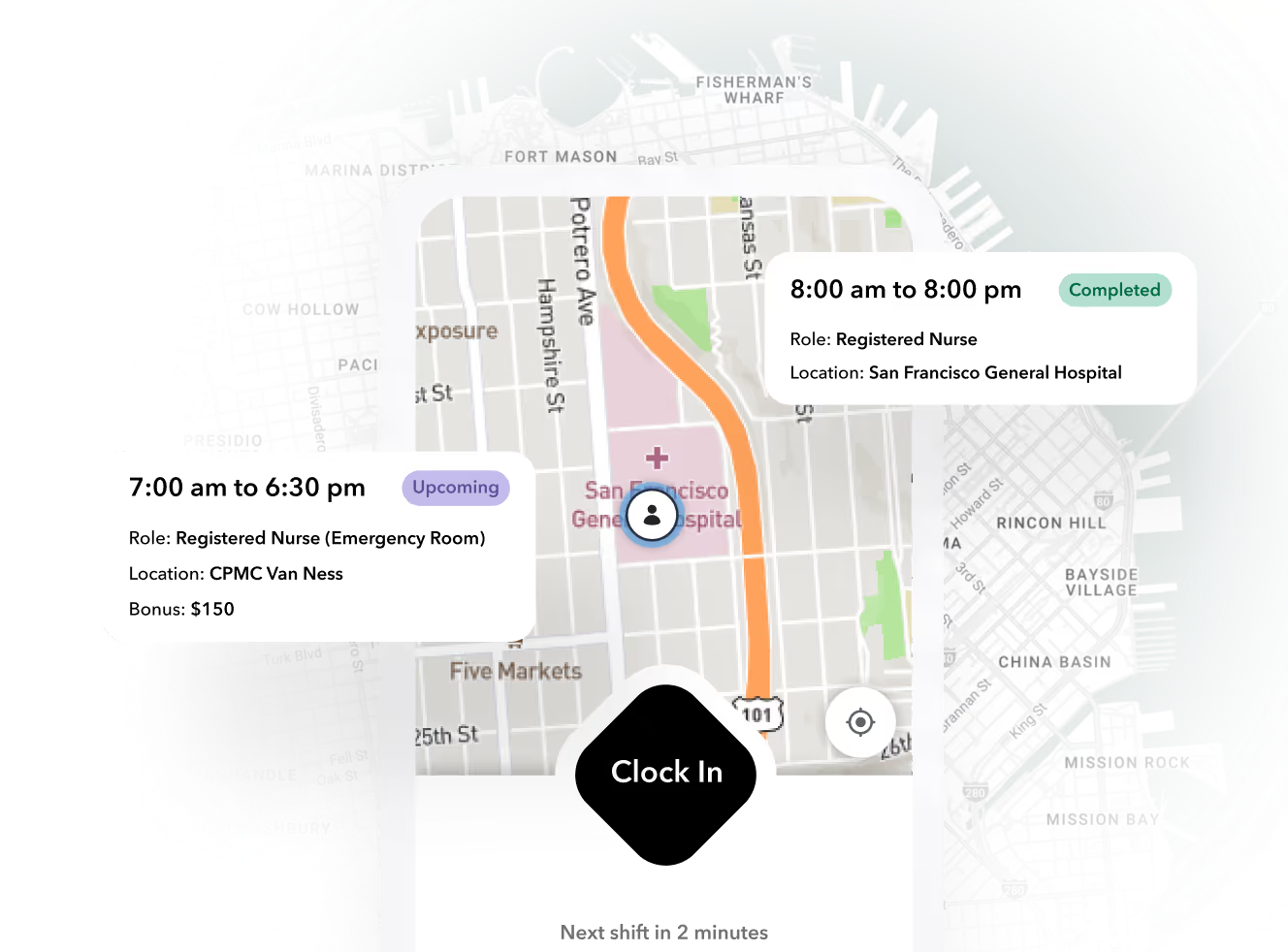
At its core, geofencing is a location-based technology that creates a virtual boundary around a real-world geographical area. Using GPS, Wi-Fi, or cellular data, it triggers a pre-programmed action when a mobile device enters or exits this digital perimeter. Think of it as an invisible tripwire for a smartphone, enabling automated tasks like clocking in for a shift or receiving location-specific notifications.
How geofencing is commonly used
In healthcare, it’s a lifesaver for coordinating teams that are always on the move, like home health agencies. By setting up a geofence around a patient's home, the system can automatically log when a caregiver arrives and leaves, taking the guesswork out of timesheets and payroll.
EVV and Geofencing
In home care and home health settings, geofencing is commonly used to support Electronic Visit Verification (EVV) requirements. EVV is a system that confirms a caregiver provided services to the correct patient, at the correct location, and for the correct duration of time.
Geofencing helps enable EVV by automatically verifying when a caregiver arrives at and leaves a patient’s home using location-based data. This removes the need for manual check-ins and creates an electronic record of the visit that can be used for documentation and compliance purposes. While EVV requirements are defined by regulation, geofencing is one of the technologies frequently used to meet those requirements in practice.
Why Geofencing Matters & Industry Context
Historical context
Historically, tracking mobile healthcare workers relied on manual check-ins and paper timesheets, which were often inaccurate and created administrative headaches. The widespread adoption of GPS-enabled smartphones paved the way for geofencing to automate these processes, offering a more reliable and efficient solution for workforce management.
Relevance in healthcare settings
In a field where compliance is critical and every minute counts, manual tracking introduces unnecessary risks. Geofencing provides a digital safety net, automating location verification to ensure staff are exactly where they need to be, on time. This not only boosts operational efficiency but also strengthens accountability, freeing up teams to focus more on patient care and less on paperwork.
How Geofencing Is Transforming Healthcare Staffing Operations
Managing a mobile healthcare team often means juggling last-minute schedule changes and chasing down timesheets. This administrative burden not only eats up valuable time but also opens the door for payroll errors and compliance headaches.
Geofencing transforms this chaos into a streamlined workflow. By automating clock-ins and location verification, it provides managers with real-time visibility and guarantees accurate records for payroll. This shift allows teams to spend less time on administrative tasks and more time delivering quality patient care.
Key benefits for healthcare teams
This automation does more than just save time. It creates a clear, indisputable record of service, which is crucial for both payroll accuracy and compliance audits. When time tracking is no longer a manual chore, teams can operate with greater trust and transparency, knowing every visit is logged correctly without any extra effort.
Key Geofencing Features for Managing Clinical Workforce Schedules
When evaluating geofencing solutions, it's crucial to look for features that directly address the unique challenges of managing a clinical workforce. The right platform moves beyond simple location tracking to offer a suite of tools designed for efficiency, compliance, and peace of mind. Here are the key features that make a real difference:
- Automation: automatically clocks staff in and out as they enter or leave a designated work site, eliminating manual timesheets.
- Alerts: provides real-time notifications for late arrivals or missed clock-ins, allowing for immediate follow-up.
- Verification: confirms staff are at the correct location for their shift, preventing off-site clock-ins and ensuring service delivery.
- Integration: seamlessly syncs time and attendance data with your scheduling and payroll systems for end-to-end accuracy.
- Reporting: creates detailed, audit-ready reports for payroll, mileage, and visit verification, simplifying administrative tasks.
Compliance, Privacy, and Security Considerations in Geofencing
While geofencing offers powerful automation, it's essential to handle it responsibly. Adopting this technology means navigating compliance, protecting employee privacy, and securing sensitive data. A thoughtful approach ensures you can reap the benefits without crossing any lines.
- Compliance: Ensures adherence to labor laws by creating accurate, indisputable records for hours worked and overtime.
- Privacy: Protects employees by only tracking location during scheduled work hours within designated geofenced areas.
- Security: Safeguards sensitive location data through encryption and secure protocols to prevent unauthorized access.
- Transparency: Builds trust by clearly communicating to staff how the technology is used and the benefits it provides for everyone.
Implementing Geofencing in Existing Healthcare Staffing Systems
This is how you can smoothly integrate geofencing into your existing staffing systems.
- Assess your current workflows. Before you jump in, map out your existing scheduling, time tracking, and payroll processes. Identify the pain points you want to solve, like manual timesheet corrections or visit verification issues. This gives you a clear roadmap for what you need the technology to do.
- Select a compatible platform. Not all geofencing tools are created equal. Look for a solution that easily integrates with the software you already use. A platform designed for healthcare will offer features that understand your specific needs, from compliance reporting to real-time alerts for missed shifts.
- Communicate with your team. Transparency is key. Explain to your staff how the system works, emphasizing the benefits for them—like accurate, automatic time tracking and fairer payroll. Address privacy concerns head-on by clarifying that tracking only occurs during scheduled work hours within designated zones.
- Launch a pilot program. Instead of a company-wide launch, start with a small, controlled group. This allows you to work out any kinks and gather valuable feedback from your team. Once you’ve refined the process, you can confidently roll it out to everyone, ensuring a smoother transition.
Measuring the Impact of Geofencing on Staffing Efficiency and Patient Care
Once geofencing is up and running, how do you know it's actually working? Measuring its impact is key to proving ROI and refining your strategy. The right metrics will reveal clear improvements in both operational efficiency and the quality of patient care.
- Efficiency: Notice a sharp decrease in time spent on payroll disputes and manual timesheet corrections, freeing up administrative staff for higher-value tasks.
- Accuracy: Payroll errors will plummet as automated records eliminate guesswork, leading to improved budget forecasting and increased employee trust.
- Patient Focus: With administrative burdens lifted, clinical staff can dedicate more focused hours to patient interaction, which often improves care outcomes and satisfaction.
- Adoption: Monitor employee feedback and support tickets to address any initial resistance or technical glitches, ensuring a smooth transition for your team.
Final Takeaways
Managing mobile healthcare teams often involves chasing down timesheets and correcting payroll errors, pulling focus away from patient care. Geofencing offers a powerful solution by creating virtual boundaries that automatically track when staff arrive at and leave a work site. This automation not only ensures payroll accuracy and simplifies compliance but also empowers your team to dedicate their time where it's needed most, improving both efficiency and the quality of care.

About the author

Content Writer at Teambridge
Anis Nanai is a content writer at Teambridge, with a focus on workforce management and the realities of running hourly teams. He prioritizes conversations with customers, staying close to the market, and understanding how workforce needs are changing. His writing connects those concerns to practical decisions about scheduling, time tracking, staffing, and automation. He examines product developments through the questions that matter to operators: what does this solve, how would it work for my team, and what evidence supports it?
Company perspective: this author works at Teambridge. Customer outcomes are attributed to their published sources.
View LinkedIn profile