Compare
Teambridge vs TempWorks: staffing software with a deep back office, or an AI layer that runs every shift.
TempWorks has served staffing agencies since 1997 with an ATS, CRM, pay and bill, tax and services like payroll funding, plus SystemIQ for AI content. Teambridge runs the daily work around each shift, with workflows and rules your team configures and AI specialists that do the follow up.


Teambridge is a fit for
- Staffing agencies whose hardest work starts after the placement
- Teams that want texting and AI follow up built in, not added through partners
- Agencies that want to change workflows and rules themselves
The operating difference
A clearer look, side by side.
TempWorks visuals are public product or brand assets where available. Teambridge is shown as the workflow layer operators use to turn events into action.
Public view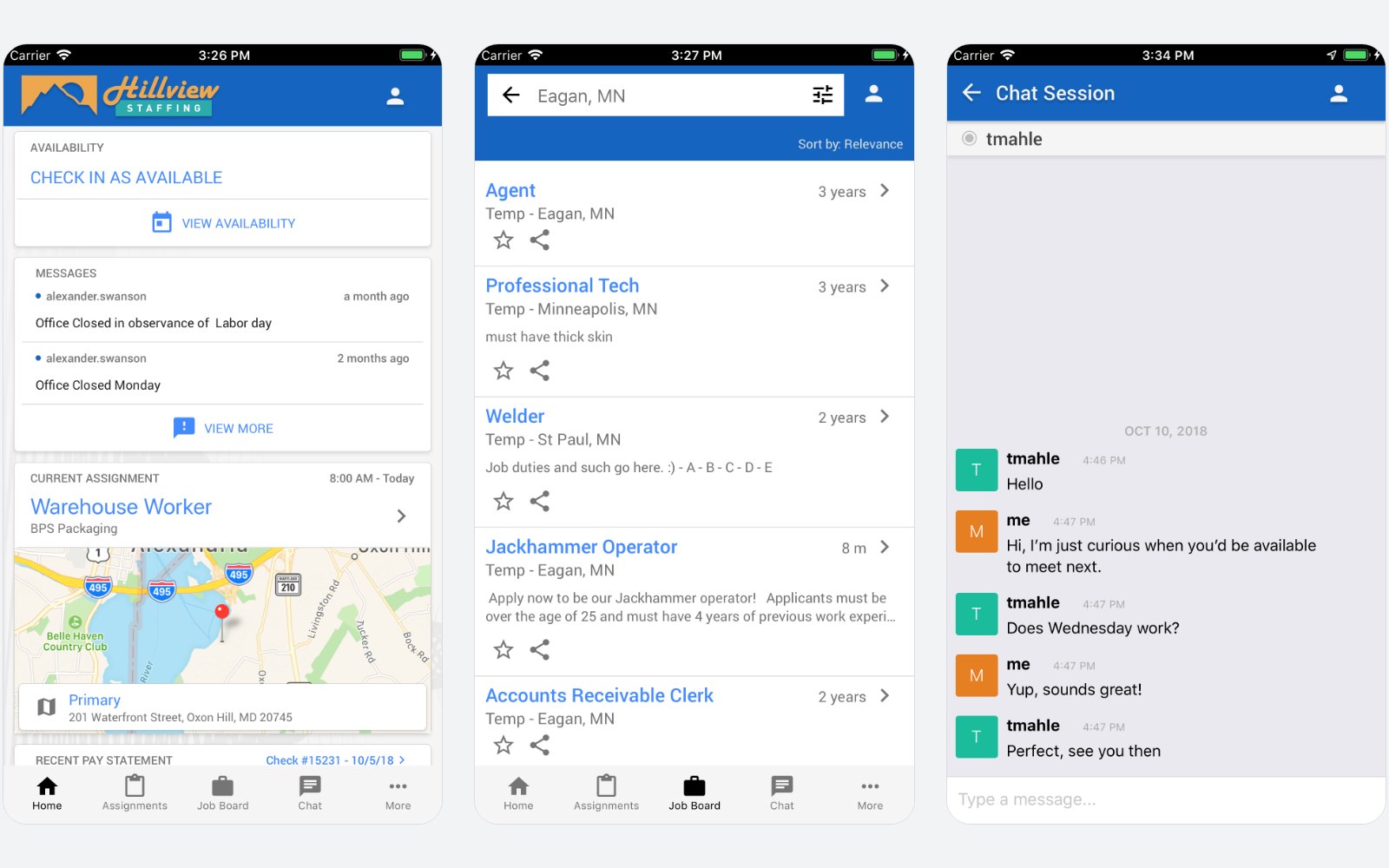 Workflow view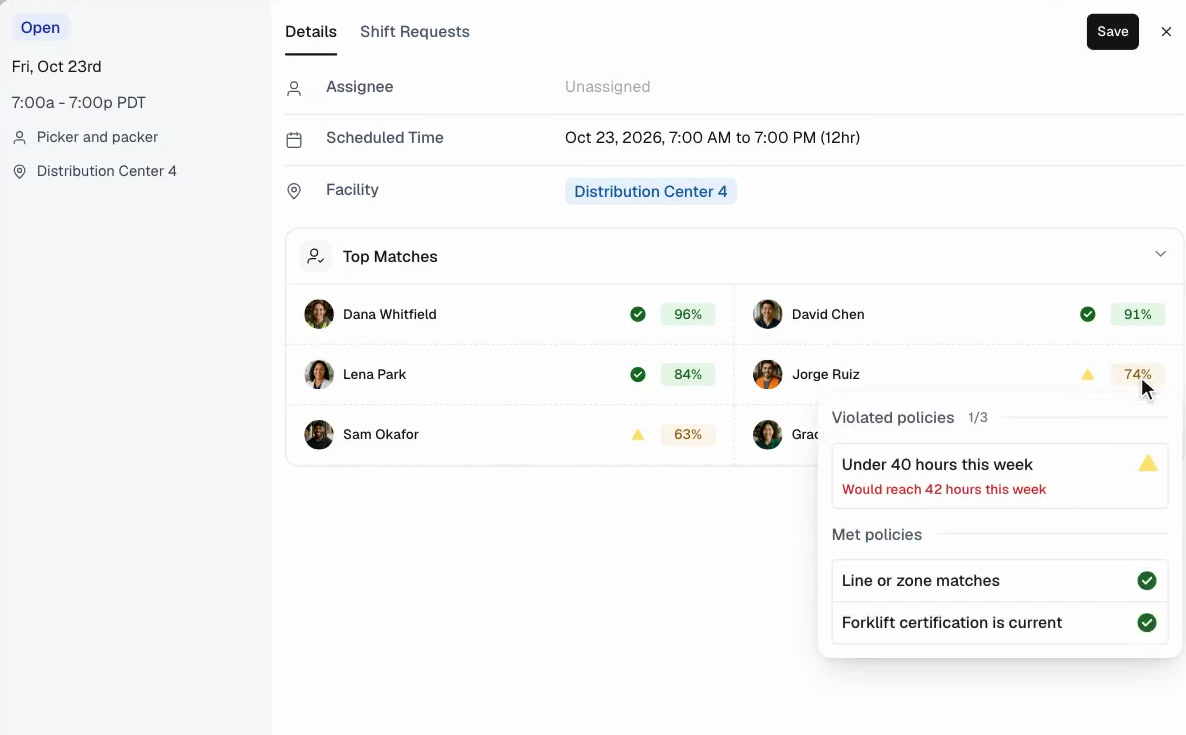
An open picker and packer shift at Distribution Center 4. Teambridge ranks qualified workers and shows the rule behind every match, like a current forklift certification.
Architecture
How each platform is built.
Staffing software with a deep back office
An ATS and CRM in the front, pay and bill, tax and ACA in the back, with AI content and portals on top. Texting connects through partners.
One record, with AI on top
Every product writes to the same record, so a hire, a shift, a punch and a paycheck are one story. Workflows decide what happens next, policies decide what is allowed, and AI specialists do the work.
Teambridge AI
AI specialists text staff, read the replies, update the record and report back.
Workflow Builder
Activity
Shift released: find a replacement
- Production shift opened at Distribution Center 4Workflow, today at 5:40 am
Policy Builder
ComplianceExpired forklift certification
Blocks anyone whose forklift certification has expired.
Under 40 hours this week
Warns before anyone goes past 40 hours.
Products
One record
Features
Feature by feature.
Based on TempWorks's public website and app listing. Where a feature is not described publicly, we say so rather than mark it missing.
What to evaluate
Three questions that actually matter.
AI that writes or AI that acts
Generating job descriptions and messages saves minutes. Ask whether the AI also texts workers, reads replies, updates the record and closes the loop.
Built in or bolted on
Texting and some app features can arrive through partners. Each partner is another contract, login and place for data to drift.
Worker experience
Compare app ratings and whether workers can find shifts, claim them, clock in and get paid from one app in your brand.
Fair read
Where each platform fits.
Where TempWorks is strong
- A staffing only vendor since 1997 with a deep back office for payroll, tax, ACA and W2s
- Services on top of software, including payroll funding and payroll and tax processing
- Flexible time capture with geofencing and facial checks, plus a client portal for approvals
Where Teambridge is strong
- AI specialists that work callouts, credentials and timecard exceptions after the placement
- Texting and two way replies built in, tied to shifts and workers
- Workflow Builder and Policy Builder your team configures in plain language
What clients say
TempWorksreviews, in clients' words.
Aggregated from public review platforms in October 2026. Ratings change over time, so open any source for current numbers.
Clients praise
- Job assignment and payroll in one system
- Customizable fields, reports and workflows
- A responsive service team in several reviews
Common watch-outs
- A clunky electronic document system
- Feature gaps between Beyond and the older Enterprise product
- Limited native texting and some reports of downtime
Which is right for you
Honestly? It depends on your team.
Both are good tools. Here is the straight answer on who each one fits best, so you pick what is right for you, not just for us.
Choose TempWorks when
- You want staffing software plus outsourced payroll, tax processing or payroll funding from one vendor
- You run a back office heavy temp agency that values configurable fields, reports and payroll proofing
- You want clients to approve time and see invoices in a portal tied to your pay and bill
Choose Teambridge when
- Callouts, no shows and credential follow up eat your recruiters' day
- You want AI that acts, not only AI that writes job descriptions
- You want texting and two way replies built into the platform
Learn how it works
Go deeper in the docs.
Fill open shifts
How Teambridge moves an open shift to a confirmed assignment.
Open docControl overtime
Block or flag overtime before it reaches payroll.
Open docPlatform concepts
Collections, workspaces, access groups, and workflows explained.
Open docVideo library
Short walkthroughs of real Teambridge workflows.
Open docAsk Nova
Open any documentation page and ask Nova how to build a workflow for your operation: scheduling, compliance, payroll prep, and more.
Open the docsFAQ
Common questions
Is Teambridge an alternative to TempWorks?
For agencies whose hardest work is running shifts, yes. Teambridge covers hiring, scheduling, communication, time and billing with AI specialists that do the follow up. If you rely on TempWorks payroll and tax services, keep that in your evaluation.
Can Teambridge work with our payroll provider?
Yes. Teambridge prepares approved hours and pay and exports them to your payroll, and can offer instant pay to workers.
Can Teambridge migrate data from TempWorks?
Yes. Implementation maps your current workflows and brings over workers, clients, jobs, documents and history so teams can go live without starting over.